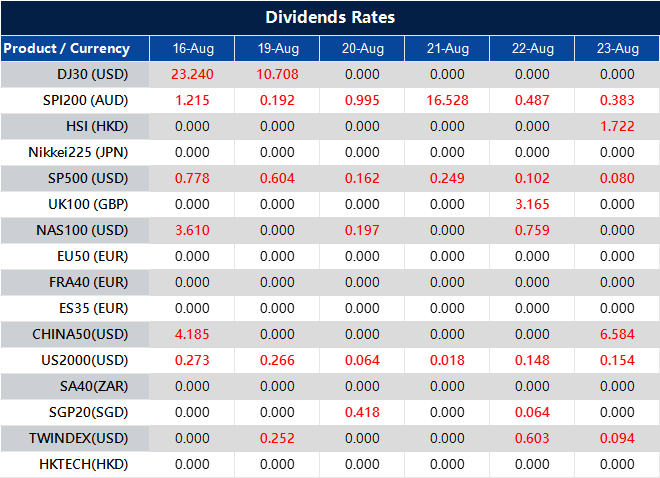
Dividend Adjustment Notice – Aug 16,2024

Dear Client,

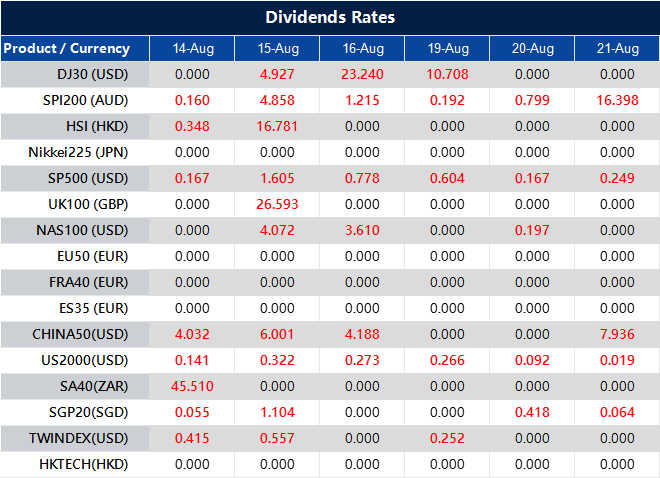
Please note that the dividends of the following products will be adjusted accordingly. Index dividends will be executed separately through a balance statement directly to your trading account, and the comment will be in the following format “Div & Product Name & Net Volume ”.

Please refer to the table below for more details:

The above data is for reference only, please refer to the MT4/MT5 software for specific data.

If you’d like more information, please don’t hesitate to contact info@vtmarkets.com.

3 ways for traders to profit from a market crash

If you want to understand why the markets are collapsing, read on to discover the reasons behind the recent Black Monday on Wall Street—and how you can still earn a tidy sum during a market crash. 

For those who have ever wondered when the next financial bubble might burst – it just did

For one, if you saw how stocks ended last week and checked the global indexes last night, you can tell there’s a lot of fear in the markets right now. 
 
Global markets have entered a perfect storm for a sell off.  

In case you missed it, here’s what happened last Monday on Wall Street:  

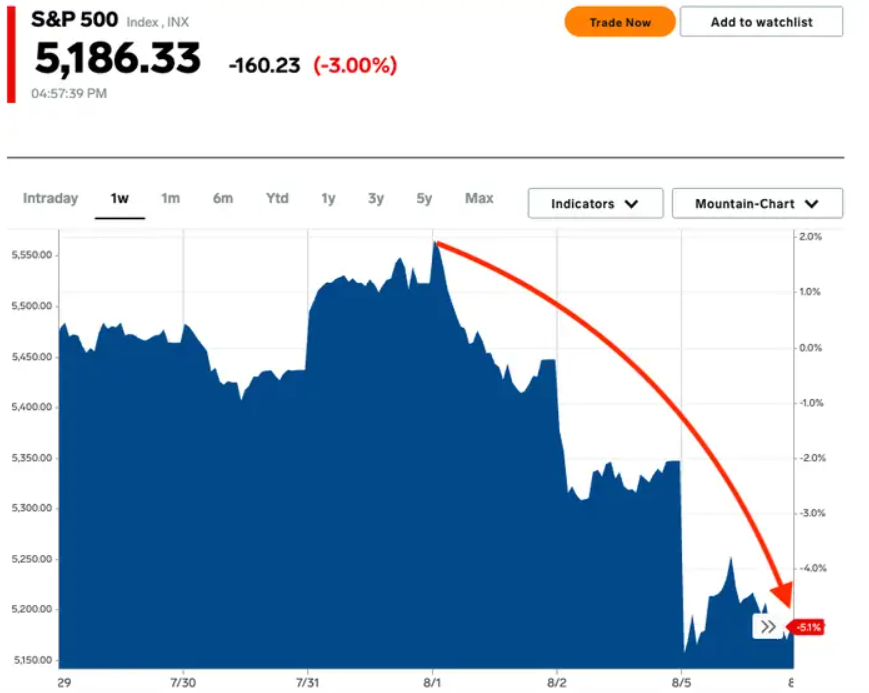
• The S&P 500 experienced its largest single-day decline since September 2022. 

• The Dow plummeted by over 1,000 points. 

• The Nasdaq 100 lost nearly $1 billion in market value. 

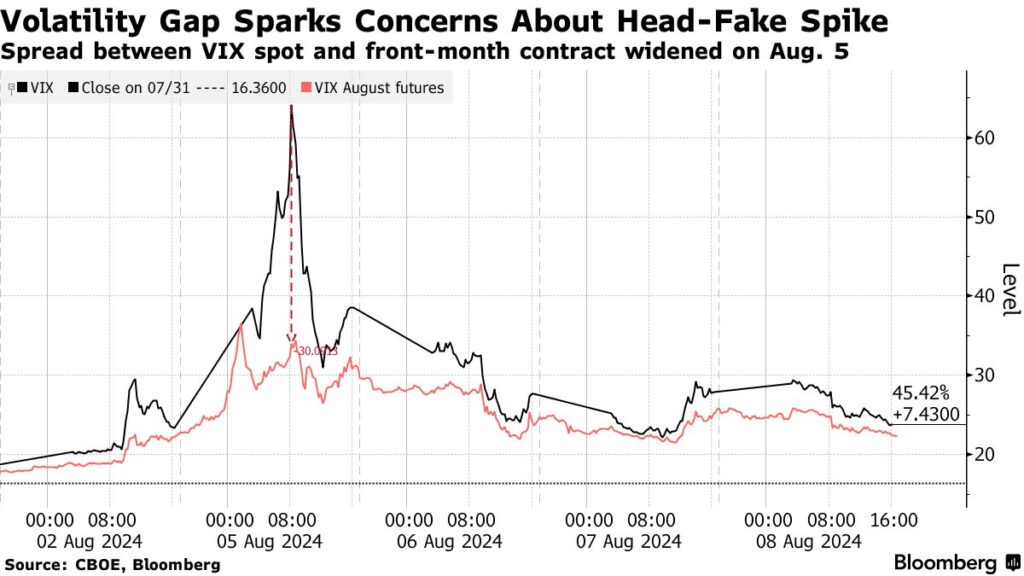
• The VIX, Wall Street’s Fear Gauge, reached levels last observed during the 2008 Financial Crisis and the 2020 pandemic. 
 
And that was only in the US. 

Source: Reuters  

There’s no way to predict exactly when a stock market downturn will occur, but it’s safe to assume it will happen eventually. Market downturns are normal, and, unfortunately, they’re also unavoidable. 

A market crash essentially means that stock prices across various sectors of the market take a sharp decline. Many investors start selling their shares at the same time, and stock prices fall. When this happens on a broad scale, a market crash can occur. 

Just like this trade that’s causing mayhem in financial markets outside the US: The yen-carry trade. 

Over the last few days, the Japanese yen has surged and hit levels that haven’t been seen since World War II. 

The recent selloff is largely due to the yen-carry trade unwinding after the Bank of Japan raised rates twice in a row for the first time in 17 years. This move caused the yen to rebound from a 40-year low of 161.61 to 142.71 against the U.S. dollar 

Traders responded by selling off foreign assets and converting their money back to yen to limit their losses. It looks like the market might have gone too far too quickly, so we’re now seeing some adjustments during the European trading session as it moves back to more normal levels. 

Here’s what we found the other day: US stock market rebound after major market selloff during recession fears 

Many people associate market crashes with losing money. But if you take the right steps before a market downturn, you might not lose money at all.  

In fact, the opportunistic would see it as the best time to take advantage of the crash and make money from it. 
 
Take a cue from the “Rich Dad Poor Dad” author Robert Kiyosaki who expected a historic crash across financial markets. 

“The biggest crash in world history is coming,” he said, adding that sell-offs create buying opportunities but that markets wouldn’t recover for a long time. “Get more gold, silver, and bitcoin while you can,” he tweeted

And because the entry point has been lowered, it’s easy for beginner traders to tap into the markets and start building their portfolios with minimal initial investment. It just takes the right approach. 

3 ways to profit from the market crash 

Exploit the yen-carry trade

While we did say that the crash was caused by the yen-carry trade, opportunities remain; the revised rates remain low enough for investor demand. As with how it has been done, the Japanese yen’s low-interest rates allow traders to borrow yen at low rates and invest in higher-yielding assets or currencies that are temporarily undervalued.  

Traders are, however, advised to be careful of sudden increases in the yen’s value due to upcoming BOJ hikes and Fed cuts; this can affect their returns. 

Trend trading 

Trend trading, a strategy based on identifying and following the direction of market movements, can be particularly effective during such volatile periods. 

We’ve written an article on why trend trading is one of the most effective ways to capture the hottest moments in the market.  
 
Read it here: The glamour of trend trading  

Short the market with CFD  

Since CFDs are derivatives, you don’t own the underlying asset. This also means you have the flexibility to respond swiftly to market crashes, capturing opportunities as they arise. 
 
Another word of wisdom to take heed from is this advice from Robert Kiyosaki

 Market crashes can be intimidating, but they also present opportunities for traders who know how to navigate them.  

Why trade CFDs with VT Markets? 

As an award-winning broker, VT Markets equips traders with everything they need to profit from the markets, regardless of market trajectory. By trading CFDs on the VT Markets app, you have… 

  • Access to a wide range of assets 
  • Tighter spread and near-instant liquidity 
  • The power of leverage for higher returns 

…which makes it easy for traders to find opportunities to profit, whether it’s a bear market, a crash, or a downturn. 
 
 
 Start trading with VT Markets now 

Why CFD Trading Might Be a Good Fit for a Side Hustle Income

What is CFD Trading?

CFD (Contract for Difference) trading allows you to speculate on the price movements of various financial assets without owning them. When you engage in CFD trading, you’re entering a contract to exchange the difference in an asset’s price from the time the trade opens to when it closes. This flexibility enables access to global markets, including stocks, commodities, indices, and currencies, making it a versatile option for traders.

Why Trading is the Perfect Side Hustle

CFD trading offers an excellent opportunity as a side hustle due to its flexibility and potential profitability. Unlike traditional jobs, CFD trading doesn’t require you to adhere to a fixed schedule. You can trade during your free time, which makes it easy to integrate trading into your existing routine. Moreover, online platforms like MT4 and MT5 provide 24/5 access to global markets, enabling you to trade from anywhere at any time.

Additionally, the leverage provided in CFD trading allows you to control larger positions with a relatively small amount of capital. This means that even if you start with a modest investment, there’s potential for significant returns. However, leverage also amplifies risk, so it’s essential to approach CFD trading with a sound strategy and risk management practices.

Where to Learn CFD Trading

Before diving into CFD trading, it’s crucial to equip yourself with the necessary knowledge. Fortunately, numerous online resources are available to help you get started. These include educational websites, trading courses, and webinars that provide comprehensive training. For instance, VT Markets offers an extensive range of educational materials tailored for both beginners and experienced traders.

Additionally, practicing with a demo account is an excellent way to gain hands-on experience without risking real money. Demo accounts allow you to simulate real market conditions, enabling you to develop and refine your trading strategies.

Starting with a Small Trading Capital

One of the most attractive features of CFD trading is the ability to start with a small trading capital. Unlike traditional investments that often require substantial upfront capital, CFD trading enables you to control larger positions through leverage. This makes it accessible for those looking to start a side hustle without a significant financial commitment.

However, it’s crucial to manage leverage carefully. While leverage can amplify your profits, it can also magnify your losses. Therefore, starting with smaller positions and gradually increasing your exposure as you gain experience is advisable.

How to Manage Risk for CFD Trading

Effective risk management is essential for success in CFD trading. One of the most important aspects of risk management is setting stop-loss orders. A stop-loss order automatically closes your position when the market moves against you by a certain amount, limiting your potential losses.

In addition to stop-loss orders, diversification is another key risk management strategy. By spreading your trades across different assets, you reduce the risk of a significant loss in any one position. For example, instead of trading only on a single currency pair, you might also consider trading commodities or indices.

Moreover, maintaining emotional discipline is crucial. It’s easy to let emotions like fear or greed influence your trading decisions, but doing so can lead to poor outcomes. Instead, stick to your trading plan and make decisions based on analysis rather than impulse.

Trading CFDs with VT Markets

VT Markets offers a reliable and user-friendly platform for CFD trading, equipped with advanced tools and resources to support your trading journey. Whether you prefer MT4 or MT5, VT Markets provides a seamless trading experience with competitive spreads and efficient order execution.

The platform also offers leverage options and risk management tools to help you trade confidently. Moreover, VT Markets’ educational resources and customer support are designed to assist traders at all levels, ensuring you have the guidance and information needed to succeed.

FAQ For CFD Trading as Side Hustle

Q: Can I start CFD trading as a side hustle with a small amount of money?

A: Yes, CFD trading allows you to start with a small capital due to leverage, but it’s crucial to manage risk carefully.

Q: Is CFD trading risky?

A: CFD trading involves risk, particularly due to leverage, but proper risk management can help mitigate potential losses.

Q: How can I learn CFD trading?

A: You can learn CFD trading through online courses, webinars, and practice on demo accounts. VT Markets offers extensive educational resources.

Q: What markets can I trade with CFDs?

A: CFDs allow you to trade various markets, including shares, commodities, indices, and currencies.

Q: Why is CFD trading a good side hustle?

A: CFD trading offers flexibility, allowing you to trade in your spare time, and the potential for significant returns with a small initial investment.

Q: How important is risk management in CFD trading?

A: Risk management is crucial to protect your capital and ensure sustainable trading, especially when using leverage.

Conclusion For CFD Trading Side Hustle

CFD trading offers a flexible and potentially profitable way to earn side income, making it an excellent choice for a side hustle. By starting with a small capital, learning the fundamentals, and managing risks effectively, you can build a sustainable trading strategy.

VT Markets provides the tools, resources, and support to help you succeed in your CFD trading journey. Whether you’re a beginner or an experienced trader, the right platform and approach can make a significant difference in your success.

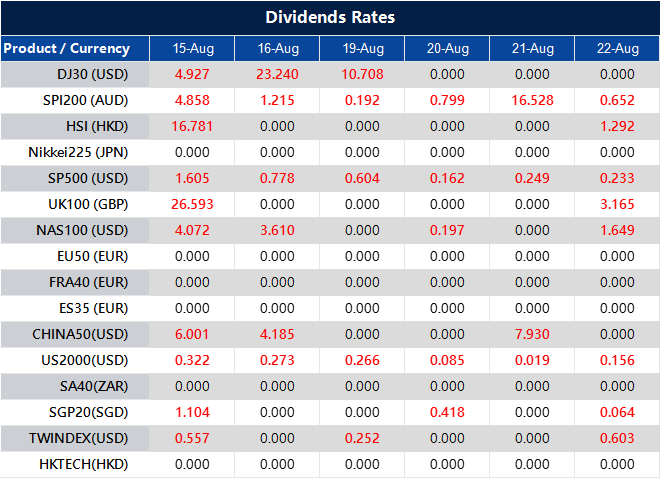
Dividend Adjustment Notice – Aug 15,2024

Dear Client,

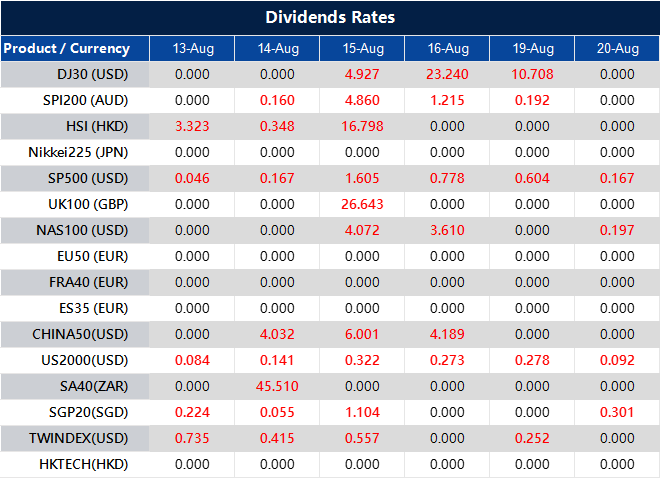
Please note that the dividends of the following products will be adjusted accordingly. Index dividends will be executed separately through a balance statement directly to your trading account, and the comment will be in the following format “Div & Product Name & Net Volume ”.

Please refer to the table below for more details:

The above data is for reference only, please refer to the MT4/MT5 software for specific data.

If you’d like more information, please don’t hesitate to contact info@vtmarkets.com.

Navigating the stock market amid recession fears

Navigating Shares Market Uncertainty During Recession

The stock market can be a daunting place, especially when headlines are filled with warnings of a possible recession. For traders, the volatility of the market can feel overwhelming, leading to decisions driven by fear rather than strategy.

However, understanding the underlying factors at play can help you make informed choices, even in uncertain times. This guide aims to simplify the complex dynamics of the current market and provide you with practical advice to navigate these choppy waters confidently.

Current market overview

The stock market has recently experienced significant fluctuations, with major indices like the S&P 500 dropping over 4% in a single week and the NASDAQ falling more than 5% in July 2024. This volatility has left many investors on edge, driven primarily by growing concerns about an impending recession.

Rising interest rates, with the Federal Reserve increasing rates to a range of 5.25% to 5.50%, coupled with persistent inflation above 3%, and global economic challenges, have all contributed to this sense of uncertainty.

The Fed’s aggressive stance on controlling inflation through rate hikes has exacerbated these fears, as higher borrowing costs threaten to slow economic growth and hurt corporate profits.

However, it’s essential to recognise that market downturns are not uncommon and can often serve as a necessary correction, where overvalued stocks adjust to more reasonable levels. The Dow Jones Industrial Average, for instance, has seen corrections of over 10% multiple times in the past decade.

While the immediate reaction to these fluctuations might be panic, understanding that such movements are part of the market’s natural cycle can help you keep a level head.

The chaos: A double-edged sword

The current market chaos is indeed a double-edged sword.

On the one hand, it reflects the uncertainty and fear that many investors feel about the economy’s future. For instance, the VIX, a measure of market volatility, surged over 30% in July 2024, highlighting the heightened anxiety.

On the other hand, some experts argue that this chaos is a “healthy correction,” where the market is realigning itself by focusing on fundamentals such as earnings growth, which has averaged around 8% annually for S&P 500 companies over the past decade.

Mark Mobius, a seasoned investor, has noted that while the recent market disruptions, such as the NASDAQ’s 7% drop in Q2 2024, may signal more economic trouble ahead, they also present unique opportunities. For traders, this perspective is crucial. It suggests that instead of getting caught up in the daily ups and downs, it’s more important to look at the bigger picture and identify areas where the market may have overreacted.

Recession fears: Are they justified?

Recession fears have been a significant driver of recent market behaviour. A recession, defined as a period of economic decline typically marked by a drop in GDP, rising unemployment, and lower consumer spending, is a frightening prospect for any investor. In 2024, the U.S. economy saw GDP growth slow to just 1.2% in Q2, compared to 2.5% in Q1, raising alarms.

There are two sides to this argument. On the one hand, the signs of a potential recession are there—economic growth has slowed, inflation remains high at 3.2%, and the Federal Reserve’s monetary tightening could eventually dampen economic activity.

Mark Mobius has pointed out that the reduced money supply, which shrank by 2.3% year-over-year in July 2024, could lead to longer-term economic challenges.

On the other hand, some experts argue that the conditions for a full-blown recession are not yet in place. For instance, credit conditions remain relatively strong, with bank lending growing by 5% annually, which typically doesn’t align with the onset of a recession.

Moreover, the job market has shown resilience, with unemployment rates still low at 3.6%. For traders, this means that while it’s important to be cautious, there’s also no need to assume that a recession is inevitable.

Investment strategies during volatility

Given the current market volatility, how should traders approach their investments? Here are some practical strategies to consider:

1. Diversification is key

One of the most effective ways to protect your portfolio during uncertain times is through diversification. By spreading your investments across different asset classes (stocks, bonds, commodities), sectors, and geographical regions, you can reduce the risk of significant losses. If one area of your portfolio underperforms, others may perform better, balancing out the overall impact.

2. Hold cash reserves

Another strategy suggested by Mark Mobius is to keep a portion of your portfolio in cash—he recommends up to 20%. This “dry powder” allows you to take advantage of opportunities that arise during market downturns, such as buying undervalued stocks. Cash reserves also provide a safety net, giving you the flexibility to make decisions without being forced to sell assets at a loss.

3. Focus on fundamentals

During volatile times, it’s easy to get caught up in market sentiment and make impulsive decisions. However, a better approach is to focus on the fundamentals of the companies you’re investing in. Look for businesses with strong balance sheets, consistent earnings, and solid growth prospects. These companies are more likely to weather economic storms and provide long-term value.

4. Patience and long-term perspective

Lastly, remember that investing is a long-term game. While the market may experience short-term volatility, history has shown that it generally trends upward over time. By maintaining a long-term perspective and not getting swayed by daily market movements, you can avoid making rash decisions that could harm your portfolio in the long run.

Conclusion For Navigating the stock market amid recession fears

Navigating the stock market during uncertainty is challenging, but understanding market dynamics and adopting a strategic approach can help you make informed decisions. For a reliable trading experience, consider VT Markets, which offers a user-friendly platform, competitive fees, and tools to help you stay focused on your long-term goals. By choosing VT Markets, you can trade confidently and effectively, even amid recession fears and market chaos. Remember, success comes from staying calm and focused on your long-term investment strategy.

Dividend Adjustment Notice – Aug 14,2024

Dear Client,

Please note that the dividends of the following products will be adjusted accordingly. Index dividends will be executed separately through a balance statement directly to your trading account, and the comment will be in the following format “Div & Product Name & Net Volume ”.

Please refer to the table below for more details:

The above data is for reference only, please refer to the MT4/MT5 software for specific data.

If you’d like more information, please don’t hesitate to contact info@vtmarkets.com.

A Complete Guide On Troubleshooting Common MT5 Issues

MetaTrader 5 (MT5) is a powerful and widely-used trading platform, offering advanced tools and features. However, like any software, users may encounter issues that can disrupt their trading experience. Understanding how to troubleshoot these common problems is crucial for maintaining a seamless trading process. In this guide, we’ll explore the most frequent MT5 issues and provide practical solutions to resolve them.

1. Installation and Login Issues

One of the first challenges traders may face with MT5 is during installation or logging in. Installation problems can arise due to compatibility issues or incomplete downloads. To ensure a smooth installation, always download MT5 from a reputable source, such as the official website or a trusted broker like VT Markets.

Troubleshooting Tips:

  • Compatibility Checks: Ensure that your operating system meets the minimum requirements for MT5.
  • Administrative Privileges: Run the installation file with administrative privileges to avoid permission-related errors.
  • Login Credentials: Double-check your login details, including server names, and ensure caps lock is off while entering your password.

2. Connection Problems

Connection issues can be frustrating, especially when you’re ready to execute a trade. These problems often stem from internet connectivity issues, incorrect server details, or firewall restrictions.

Troubleshooting Tips:

  • Internet Connection: Verify that your internet connection is stable. If possible, use a wired connection for greater reliability.
  • Correct Server Information: Ensure you’ve entered the correct server information provided by your broker.
  • Firewall and Antivirus Settings: Check your firewall and antivirus settings to ensure they’re not blocking MT5. You may need to add MT5 to the list of allowed programs.

3. Chart Display Issues

Sometimes, MT5 charts may not display correctly, or data might not appear as expected. This can hinder your ability to analyze markets effectively.

Troubleshooting Tips:

  • Refreshing Charts: Right-click on the chart and select “Refresh” to reload the data.
  • Update Data Feeds: Ensure that your data feeds are up-to-date by checking with your broker. Outdated data feeds can cause chart discrepancies.
  • Check Timeframes: Verify that you’re viewing the chart on the correct timeframe, as this can affect the displayed data.

4. Slow Platform Performance

A sluggish MT5 platform can disrupt your trading experience, leading to missed opportunities and frustration. Performance issues are often caused by high CPU usage, too many indicators, or insufficient hardware resources.

Troubleshooting Tips:

  • Reduce Indicators: Limit the number of indicators and expert advisors running simultaneously. This can reduce the CPU load.
  • Close Unused Charts: Keep only essential charts open to free up system resources.
  • Upgrade Hardware: If possible, consider upgrading your computer’s RAM or processor for smoother performance.

5. Order Execution Delays

Order execution delays can result in significant losses, especially in a fast-moving market. These delays might be caused by server issues, internet lag, or broker-related factors.

Troubleshooting Tips:

  • Check Server Status: Verify with your broker if their servers are running optimally. Server overloads can cause delays in order execution.
  • Optimize Internet Connection: A stable and fast internet connection is crucial for timely order execution. Consider upgrading your internet plan if you experience consistent delays.
  • Order Types: Ensure you’re using the correct order type for your trading strategy. Market orders may execute faster than limit or stop orders under certain conditions.

6. Platform Freezing and Crashes

Platform freezing or crashes can severely disrupt your trading activities. These issues are often due to software bugs, incompatible plugins, or system resource constraints.

Troubleshooting Tips:

  • Update MT5: Regularly update your MT5 platform to the latest version to benefit from bug fixes and improvements.
  • Remove Incompatible Plugins: Uninstall any third-party plugins or indicators that may be causing conflicts with MT5.
  • Monitor System Resources: Keep an eye on your computer’s resource usage. If MT5 consumes too much CPU or memory, close unnecessary applications running in the background.

7. Data Synchronization Issues

Synchronization problems can cause discrepancies between your platform’s data and the actual market data, leading to inaccurate trading decisions.

Troubleshooting Tips:

  • Re-login: Logging out and back into your MT5 account can sometimes resolve synchronization issues.
  • Server Selection: If you’re experiencing frequent data lags, try connecting to a different server within your broker’s options.
  • Clear Cache: Clear the platform’s cache to remove outdated data that might be causing the issue.

Conclusion for Troubleshooting MT5

Mastering MT5 troubleshooting ensures a smoother trading experience, minimizing disruptions and allowing you to focus on making informed trading decisions. By proactively addressing common issues, you can enhance your efficiency and capitalize on market opportunities without unnecessary interruptions. Regularly updating your software, maintaining a stable internet connection, and being mindful of your platform’s resource usage are key strategies in this process.

FAQs About Troubleshooting MT5 Issues

Q: Why is my MT5 platform not opening after installation?

A: Ensure that your system meets the minimum requirements and that you have installed the latest version of MT5.

Q: How can I fix frequent disconnections on MT5?

A: Verify your internet connection’s stability and ensure that your firewall isn’t blocking MT5’s access.

Q: What should I do if my charts are not updating in real-time?

A: Refresh the chart, check your data feeds, and ensure your internet connection is stable.

Q: Why is my MT5 platform running slowly?

A: Reduce the number of open charts and indicators, and consider upgrading your computer’s hardware.

Q: How do I resolve order execution delays?

A: Check the status of your broker’s servers, optimize your internet connection, and use appropriate order types.

Q: What causes MT5 to freeze or crash?

A: Software bugs, incompatible plugins, or high CPU usage can cause MT5 to freeze or crash. Regular updates and resource management can help prevent this.

Q: How can I synchronize my MT5 data with the actual market data?

A: Try re-logging into your account, switching servers, or clearing the platform’s cache to resolve synchronization issues.

Ready to take your Forex Trading to the next level? Sign up with VT Markets today and enjoy a seamless trading experience on MT5. Open a demo account to practice or dive straight into live trading with one of the most trusted brokers in the industry. Don’t let technical issues hold you back—trade with confidence at VT Markets!

Dividend Adjustment Notice – Aug 13,2024

Dear Client,

Please note that the dividends of the following products will be adjusted accordingly. Index dividends will be executed separately through a balance statement directly to your trading account, and the comment will be in the following format “Div & Product Name & Net Volume ”.

Please refer to the table below for more details:

The above data is for reference only, please refer to the MT4/MT5 software for specific data.

If you’d like more information, please don’t hesitate to contact info@vtmarkets.com.

A Complete Guide on Troubleshooting Common MT4 Issues

Troubleshooting MT4 Issues

MetaTrader 4 (MT4) remains one of the most popular trading platforms worldwide. Despite its robust features, even seasoned traders encounter occasional technical hiccups. Troubleshooting these issues can be frustrating, especially when they disrupt your trading flow. This guide provides practical solutions to common MT4 issues, ensuring a smoother trading experience.

1. MT4 Installation Problems

One of the most common issues new users face is problems during the installation of MT4. This problem can stem from several factors, such as incompatible system requirements, lack of administrative permissions, or interference from antivirus software.

To resolve this, first, ensure your system meets the minimum requirements for MT4. Most modern computers should have no trouble running MT4, but it’s always wise to check. If you encounter issues during installation, try running the setup file as an administrator. Right-click on the file and select “Run as Administrator.” This simple step can often bypass security restrictions and complete the installation successfully.

Antivirus software can also cause problems by mistakenly flagging MT4 files as threats. If this occurs, temporarily disable your antivirus software during installation. Remember to enable it again after the installation is complete to keep your system protected.

2. MT4 Not Connecting to the Server

A common frustration is when MT4 fails to connect to the server. This issue prevents you from executing trades and accessing market data, potentially leading to missed opportunities. Several factors can cause connection issues, including server problems, internet connection issues, or incorrect account settings.

To troubleshoot, first, check your internet connection. Ensure you are connected to a stable and fast network. If your connection is fine, the problem may lie with the MT4 server. You can check the server status by looking at the bottom right corner of your MT4 platform. If the connection is weak or absent, try switching servers by going to “File” > “Open an Account,” and then selecting a different server from the list.

Sometimes, the issue could be related to your account credentials. Ensure you’ve entered the correct login details, including the server name, account number, and password. If everything seems correct but the problem persists, contacting your broker for support is the next step.

3. MT4 Freezing or Crashing

MT4 freezing or crashing can be particularly frustrating, especially when you’re in the middle of a trade. This problem can result from overloading the platform with too many charts, indicators, or Expert Advisors (EAs).

One effective solution is to reduce the number of active charts and indicators. Although it might be tempting to keep multiple charts open, it can strain your system’s resources, leading to performance issues. Close any unnecessary charts and remove indicators that you’re not actively using.

Another useful tip is to limit the historical data loaded on your charts. Go to “Tools” > “Options” > “Charts,” and adjust the “Max bars in history” and “Max bars in chart” settings. Reducing these values can help the platform run more smoothly.

If MT4 continues to crash, consider reinstalling the platform. Before doing so, back up your profiles, templates, and any custom indicators or EAs to prevent data loss.

4. Missing Trading History

Your trading history is crucial for analyzing past performance and making informed decisions. Sometimes, traders find their history missing or incomplete in MT4. This issue often arises after switching accounts, reinstalling the platform, or clearing cache files.

To restore your trading history, go to the “Account History” tab in the terminal window, right-click, and select “All History.” This action should reload your entire trading history. If the problem persists, you might need to request your full trading history from your broker.

In some cases, clearing the cache files might help. However, be cautious with this approach as it can sometimes delete important data. To clear the cache, go to the “MQL4” folder in your MT4 directory, locate the “history” folder, and delete the relevant files. Restart MT4 afterward to see if the issue is resolved.

5. Orders Not Executing Properly

Another common issue is when orders fail to execute correctly, leading to missed trades or errors. This problem can occur due to several reasons, including incorrect lot sizes, insufficient margin, or trading outside of market hours.

First, ensure you have sufficient funds in your account to cover the trade. If your margin is too low, the order will not be executed. Additionally, check the lot size you’ve set for your trade. If it exceeds the allowable size set by your broker, the order will be rejected.

Another factor to consider is the market hours. Ensure that you are trading within the specified hours for the asset you’re interested in. Some assets have specific trading windows, and attempting to trade outside these hours will result in a failed order.

If you’ve checked all these factors and the problem persists, it’s advisable to contact your broker for further assistance.

6. Platform Customization Issues

MT4 is known for its flexibility and customization options, but these features can sometimes lead to problems. Custom indicators, EAs, or templates might not work as expected, leading to errors or platform instability.

To troubleshoot, ensure that the custom tools you’re using are compatible with your version of MT4. Sometimes, older indicators or EAs may not work correctly with newer versions of the platform. Additionally, check the code of custom scripts for any errors. If you’re not familiar with coding, it’s best to seek assistance from a professional or the community.

If you encounter persistent issues, try resetting your platform to its default settings. Go to “Tools” > “Options” > “Charts,” and reset all settings to default. This action can often resolve issues related to platform customization.

Conclusion For Troubleshooting MT4 Common Issues

MT4 remains a powerful and reliable trading platform, but like any software, it’s not without its issues. By understanding and troubleshooting common problems such as installation issues, connection problems, freezing, and order execution errors, you can ensure a smoother trading experience. Remember, proactive maintenance and staying updated with the latest software versions can prevent many of these issues from occurring in the first place.

For a comprehensive trading experience, consider trading with VT Markets, a regulated multi-asset broker that provides excellent support for MT4 users. Whether you’re new to trading or a seasoned professional, VT Markets offers the tools and resources you need to succeed. Open a demo account today and start trading with confidence.

FAQs

Q: Why does MT4 keep disconnecting from the server?

A: Connection issues can stem from weak internet, server problems, or incorrect account settings. Ensure a stable connection and verify your settings.

Q: How can I reduce MT4 freezing or crashing?

A: Reduce the number of open charts, limit historical data, and close unused indicators. If issues persist, consider reinstalling MT4.

Q: What should I do if my orders are not executing?

A: Check for sufficient funds, correct lot sizes, and ensure you’re trading within market hours. Contact your broker if the problem continues.

Q: How do I restore my trading history in MT4?

A: Go to the “Account History” tab, right-click, and select “All History.” This should reload your trading history.

Q: Can I use custom indicators and EAs on MT4?

A: Yes, but ensure they are compatible with your MT4 version. If issues arise, check the code or seek professional assistance.

Q: What should I do if my MT4 platform won’t install?

A: Ensure your system meets the requirements, run the setup as an administrator, and temporarily disable antivirus software if needed.

Ready to enhance your MT4 trading experience? Start your Forex Trading journey with VT Markets today by opening a demo account!


Crude Oil Gains as Mideast Tensions Increase

This week’s market preview highlights the key events and data releases to watch in the second week of August 2024. U.S. stocks slid last week, with small-cap shares and tech leading the way. Growth fears exacerbated by soft U.S. jobs data drove a broad global risk-off move.  

U.S. two-year Treasury yields fell to 15-month lows near 3.90% as markets priced in the potential for a 50-basis point rate cut in September and multiple cuts through 2025. 

KEY ECONOMIC INDICATORS

RBNZ interest rate decision

  • RBNZ rates decision is not clear cut. 
  • Markets marginally favour it to reduce rates for the first time since the pandemic, putting the probability of a 25 basis point reduction to the cash rate to 5.25% at just over 60%. 

Crude oil inventories

  • Commercial crude oil stockpiles, excluding the Strategic Petroleum Reserve, drop by 3.7 million barrels; Analysts predicted a fall of 500,000 barrels. 
  • Global oil demand, meanwhile, is anticipated to reach 102.91 million bpd in 2024, while demand is expected to be around 104.68 million bpd in 2025. 

Initial jobless claims

  • Initial claims for state unemployment benefits fell 17,000 to a seasonally adjusted 233,000 for the week ended Aug. 3, the Labor Department said on Thursday. 
  • The largest drop in about 11 months.  

Commodity prices are projected to experience a slight downturn in 2024 and 2025 but are expected to remain above pre-pandemic levels.  

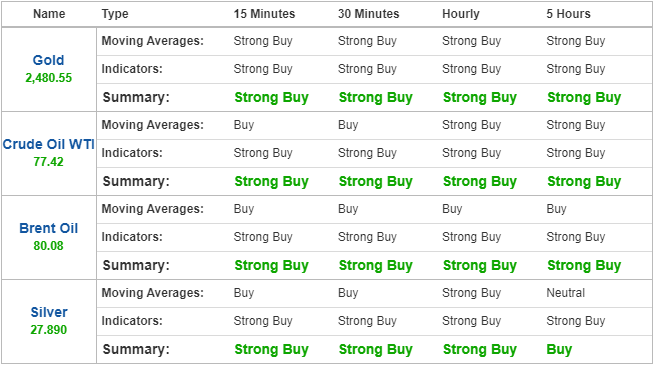
Technical indication shows us a potential incline on the commodities mark.

CURRENCIES

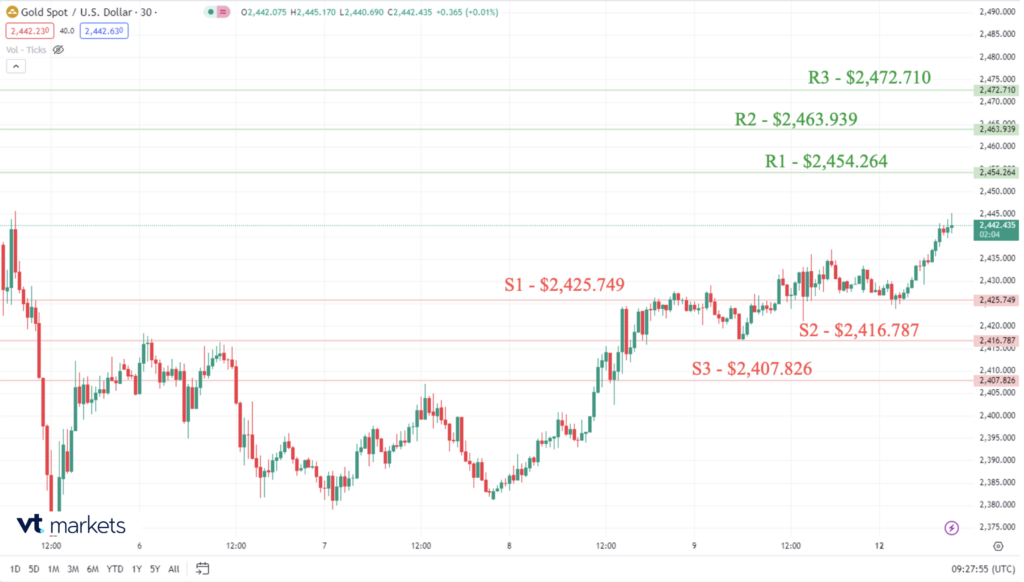
XAU/USD

  • S1-S3 – Means potential Support points. If the market declines further, these are the potential levels it can reach.
  • R1-R3 – Means potential Resistance points. If the market starts to increase again, these are the potential levels it can reach.

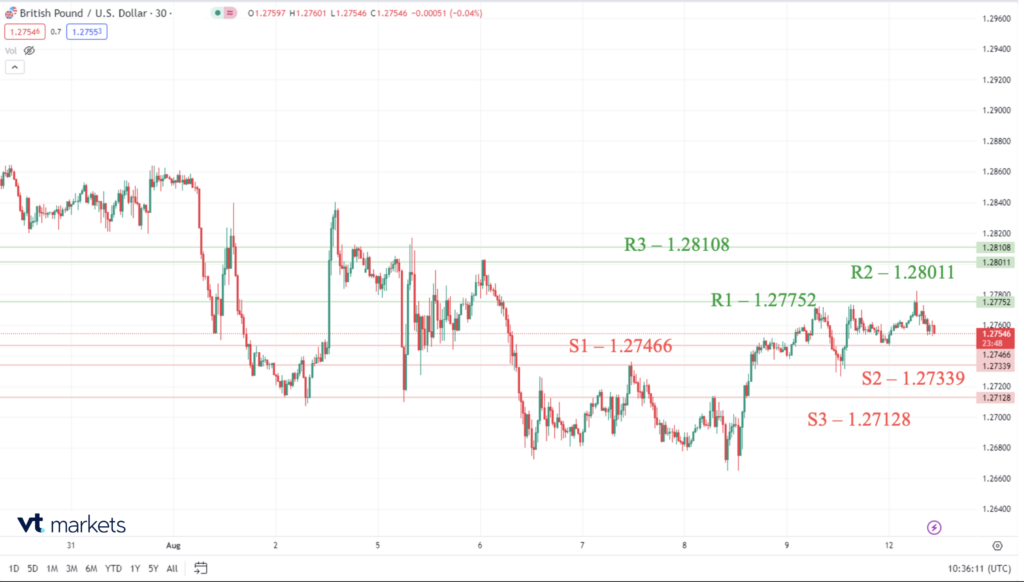
GBP/USD

United Kingdom Retail Sales (MoM) is taking place on Friday, August 16th at 07:00 GMT +1.

What is the forecast for United Kingdom Retail Sales (MoM)?

  • The consensus for the next United Kingdom Retail Sales (MoM) is 0.8, and the last deviation was -0.59735.
  • The Pound Sterling moves higher against the US Dollar on improved market sentiment.
  • BoE’s ( Bank of England) Mann warns about upside risks to price pressures.
  • The Fed is expected to cut interest rates by 25 bps in September.

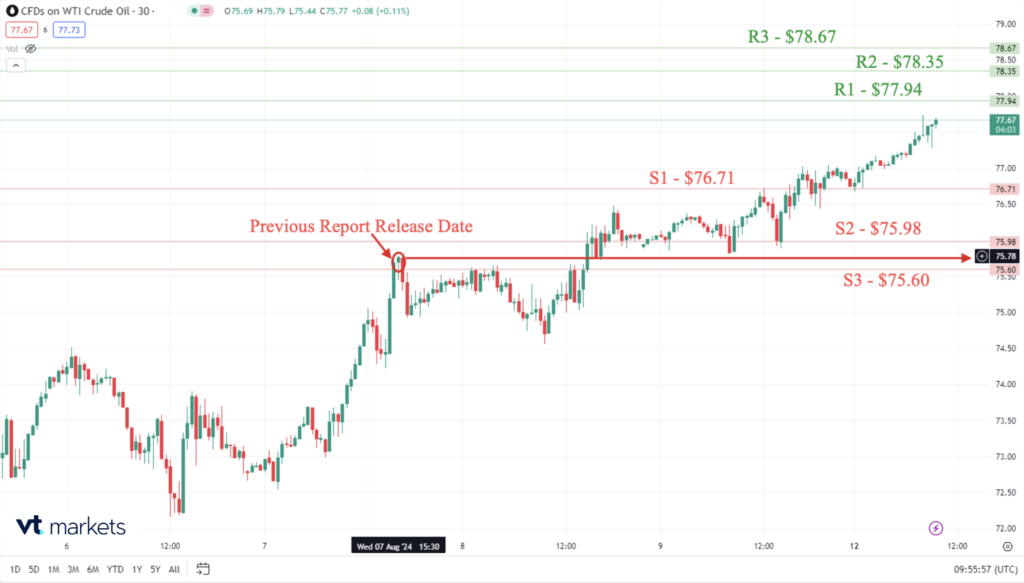
Crude oil inventories expectations

The Inventory Report will be released this Wednesday, 14 August 2024 at 15:30 GMT+1.

Events since the last release of the Inventory Report:

  • U.S. crude oil posts more than 4% weekly gain as recession fears ease, Mideast tensions loom.
  • The stock market rebound after Monday’s sell-off combined with Middle East military tensions to lift oil prices this week.
  • Middle East Conflict to Remain a Critical Driver as it Continues to Underpin Oil Prices.

Previous Report Figures and Forecast Figures for the latest release -3,728M (Barrels of Oil).

Forecast Figures for 14 August 2024 – TBA (To be Announced) (Barrels of Oil).

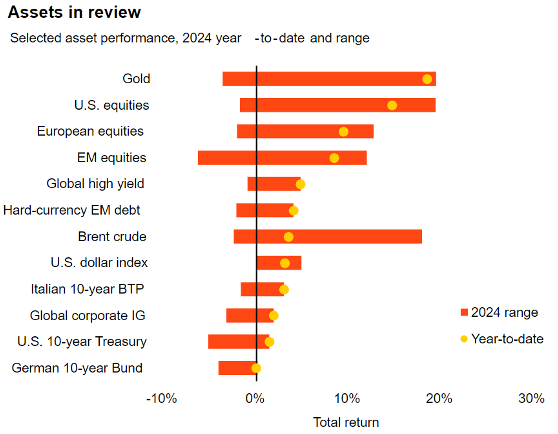
One-year commodity assets performance

The year-to-date performance on commodity assets with the potential range can be achieved until the end of 2024.

MARKET NEWS

Stocks close higher, clawing back much of the week’s losses in a major recovery from Monday’s sell-off

  • The S&P 500 advanced 0.47% to finish at 5,344.16.
  • The Nasdaq Composite added 0.51% to close at 16,745.30.
  • The Dow Jones Industrial Average inched up 51 points, or 0.13%, to end at 39,497.54.
  • The blue-chip Dow and tech-heavy Nasdaq were down on the week by 0.6% and 0.18%, respectively.

Oil extends gains for fifth session on Mideast tensions, US data

  • Brent crude futures were up to $80.39 a barrel.
  • US West Texas Intermediate crude futures rose 88 cents, or 1.2%, to $77.72.
  • Brent gained 3.7% last week, while WTI rose by 4.5%, buoyed by economic data and increased hopes of a US interest rate cut.

Dollar edges higher ahead of key CPI release

  • At 04:30 ET (09:30 GMT), the Dollar Index, which tracks the greenback against a basket of six other currencies, traded 0.1% higher to 103.017
  • July CPI data is expected to show that inflation continued to edge closer to the Fed’s 2% annual target, with forecasts tipping annual core inflation to fall a tick to 3.2%
  • In Europe, EUR/USD edged higher to 1.0920, not far from last week’s 1.1009 peak, the pair’s highest level since January.
  • GBP/USD traded flat at 1.2759 at the start of a busy U.K. economic data calendar this week as investors look for clues as to whether the Bank of England will continue its rate-cutting cycle next month.

Click here to open account and start trading.

Back To Top
server

Hello there 👋

How can I help you?

Chat with our team instantly

Live Chat

Start a live conversation through...

  • Telegram
    hold On hold
  • Coming Soon...

Hello there 👋

How can I help you?

telegram

Scan the QR code with your smartphone to start a chat with us, or click here.

Don’t have the Telegram App or Desktop installed? Use Web Telegram instead.

QR code