

Key Takeaways
- VT Markets gives traders access to multiple markets, including forex, stocks, commodities, indices, ETFs, bonds, and cryptocurrencies from a single platform.
- Beginners can start with a demo account, use a Cent Account for smaller trade sizes, or learn from experienced traders through Copy Trading.
- The VT Markets app includes beginner-friendly features such as watchlists, multi-timeframe charts, one-tap trading, and two-factor authentication.
- Traders can access additional tools including TradingView charts, Economic Calendar alerts, Trading Central market analysis, and technical indicators.
- VT Markets supports MT4, MT5, and mobile trading, allowing users to monitor markets and manage trades from almost anywhere.
- Client funds are held in segregated accounts, and VT Markets operates through regulated entities in multiple jurisdictions (FSCA, FSC, and CMA under Category 5 licence)
When starting your trading journey, choosing the right trading app is one of the most important decisions you can make. A good platform should be easy to use, provide access to a variety of markets, and offer the tools needed to learn, analyse, and trade with confidence.
VT Markets is designed for traders of all experience levels. Whether you are exploring the markets for the first time or looking to expand your trading knowledge, the platform combines user-friendly features with professional trading tools to help you navigate global financial markets.
This guide explains why VT Markets is considered one of the best trading apps for beginners. You will learn about its key features, account types, trading tools, and how it supports traders across a range of markets, including forex, stocks, commodities, indices, ETFs, bonds, and cryptocurrencies.
Everything You Need to Trade in One App
One of the advantages of VT Markets is the ability to access multiple financial markets from a single platform. Instead of opening separate accounts for different asset classes, traders can explore a wide range of opportunities in one place.
The platform offers access to forex, stocks, gold, commodities, indices, ETFs, bonds, and cryptocurrencies through Contracts for Difference (CFDs). This allows traders to diversify their market exposure and explore different trading opportunities as they gain experience.
VT Markets also integrates with MetaTrader 4 (MT4) and MetaTrader 5 (MT5), two of the world’s most popular trading platforms. These platforms provide charting tools, market analysis features, and flexible order management to help traders make informed decisions.
Through the VT Markets mobile app, traders can monitor markets, manage their accounts, and place trades from almost anywhere. For beginners, this provides a convenient way to learn and gain market experience, while more active traders can stay connected to global markets throughout the trading day.
Benefits of Trading Forex with VT Markets
If you’re new to trading, understanding the platform’s advantages can help you get started with confidence. Here are some of the key benefits of trading with VT Markets.
1. Competitive Spreads Across Global Markets
Every trade comes with a cost, and one of the most common trading costs is the spread, which is the difference between the buy and sell price of an asset.
VT Markets offers competitive spreads across a wide range of markets, including forex, commodities, indices, shares, ETFs, bonds, and cryptocurrencies. With spreads starting from 0.0 pips on selected accounts, traders can better manage their trading costs as they gain experience.
2. Learn from Experienced Traders with Copy Trading
For many beginners, knowing when to enter or exit a trade can be challenging. VT Markets offers copy trading features, which allows traders to automatically replicate the trades of experienced strategy providers.
This can help new traders observe how experienced traders approach the markets while participating in real market conditions. Traders remain in control of their accounts and can choose which strategies to follow based on their own preferences and risk tolerance.
3. Start Small with a Cent Account
Not every trader wants to begin with a large deposit. VT Markets offers a Cent Account that allows traders to participate in live markets using smaller position sizes.
In a Cent Account, balances are displayed in cents rather than dollars. For example, a deposit of USD100 is displayed as 10,000 cents. This allows beginners to gain practical trading experience while managing risk more comfortably.
4. Flexible Account Options
Different traders have different requirements. VT Markets offers a range of account types, including standard STP, raw ECN, Cent, and Swap-Free accounts.
Swap-Free accounts are available for traders who prefer not to pay or receive overnight interest charges, including those seeking Shariah-compliant trading conditions.
5. Trade with MT4, MT5, and Mobile Apps
VT Markets supports MetaTrader 4 (MT4) and MetaTrader 5 (MT5), two of the world’s most widely used trading platforms.
Traders can access charts, analysis tools, and order management features from desktop or mobile devices. Moreover, the VT Markets mobile app also allows users to monitor markets, manage accounts, and place trades while on the go.
6. Regulated Trading Environment
Security and trust are important when choosing a trading platform. VT Markets operates through regulated entities in multiple jurisdictions and maintains client funds in segregated accounts, keeping client funds separate from company operational funds in accordance with applicable regulations.
The company also follows compliance procedures such as Anti-Money Laundering (AML) and Know Your Customer (KYC) requirements. Eligible clients may have access to client fund insurance coverage of up to USD 1,000,000 per account, subject to applicable terms, conditions, and exclusions.
Read more details on VT Markets’ regulatory framework: Is VT Markets a Regulated Broker?
Core Features of the VT Markets App
The VT Markets app offers a range of features designed to make trading simpler, more organised, and easier to manage.
Easy Onboarding
Beginners can get started on the VT Markets app in a few simple steps. After downloading the app, users can register an account, explore the platform, view live charts, and open a demo account to practise trading with virtual funds.
This makes it easier for new traders to become familiar with the app before moving to a live account. They can learn how to search for instruments, monitor price movements, and understand basic trading functions without using real capital.
Watchlist
With thousands of tradable instruments available, it can be difficult to keep track of everything that interests you. The watchlist feature allows traders to save and monitor their preferred markets in one place.
For beginners, a watchlist can help narrow the focus to a small group of assets instead of constantly searching through the entire platform. As trading experience grows, additional instruments can be added and organised into different watchlists.
How to use the watchlist on the VT Markets app:
1. Open the VT Markets app and navigate to the Markets.
2. Tap the Watchlist tab to view your existing watchlist or create a new one.
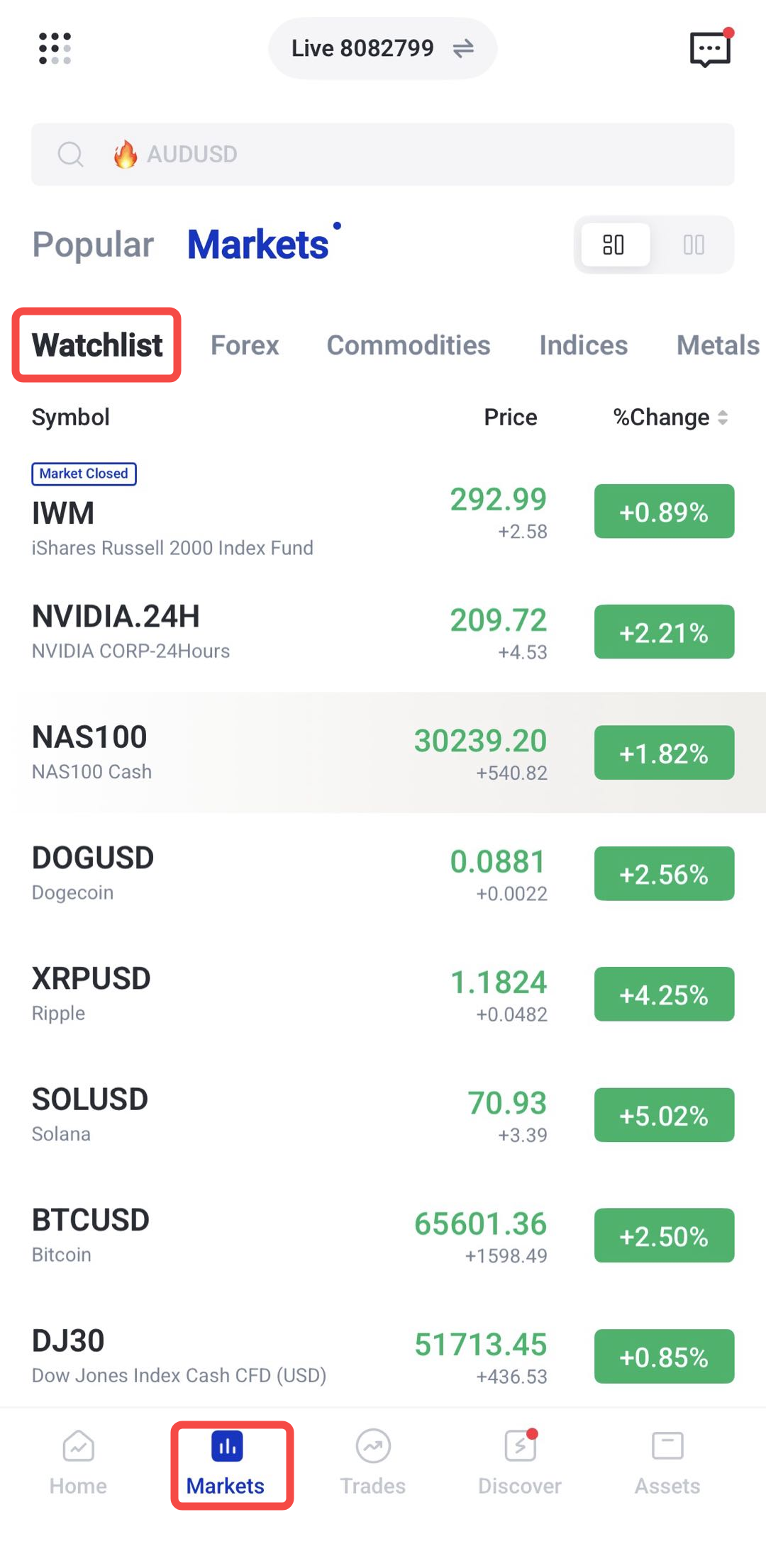
3. Search for an instrument you want to follow, then tap the ⭐ icon
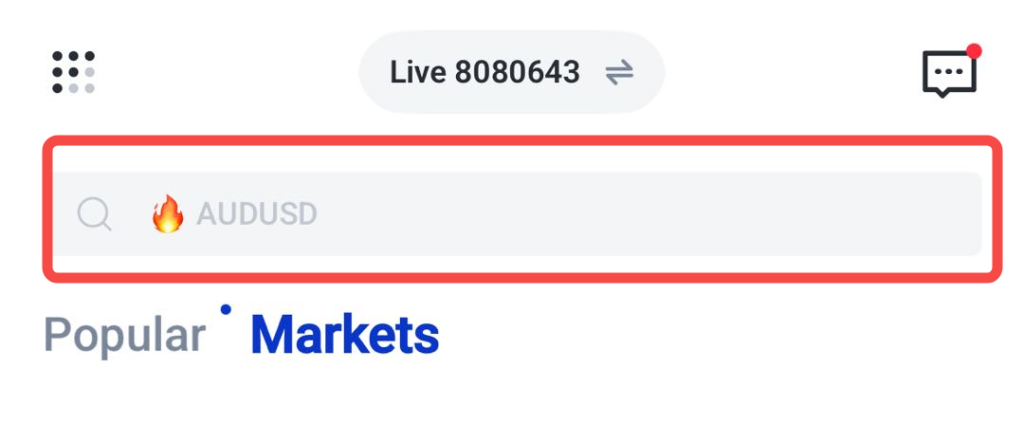
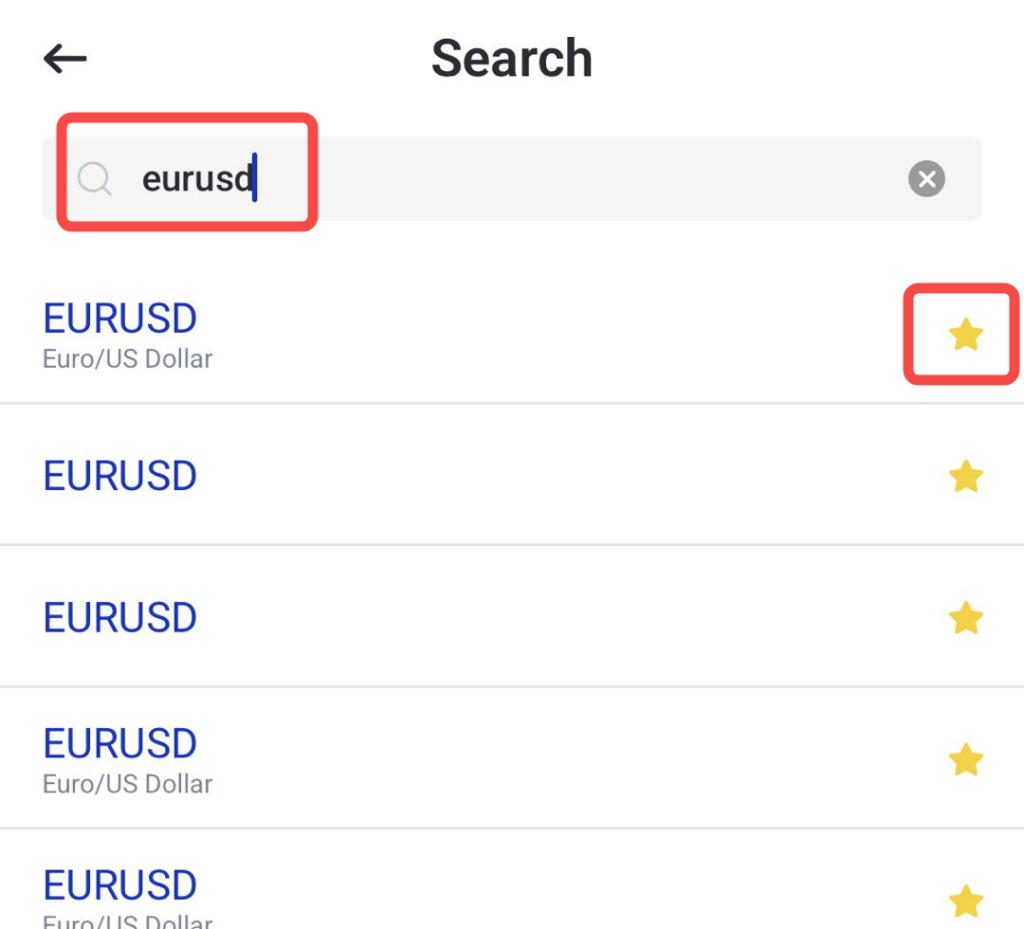
4. Rearrange assets and set price alerts if required.
Copy Trading
Copy Trading allows traders to automatically replicate the trades of experienced strategy providers. This feature can help beginners gain exposure to the markets while learning how more experienced traders manage their positions.
Rather than making every trading decision independently, users can choose a strategy provider and have eligible trades copied directly into their account. Traders remain in control and can stop copying or adjust their settings at any time.
How to use Copy Trading on the VT Markets app:
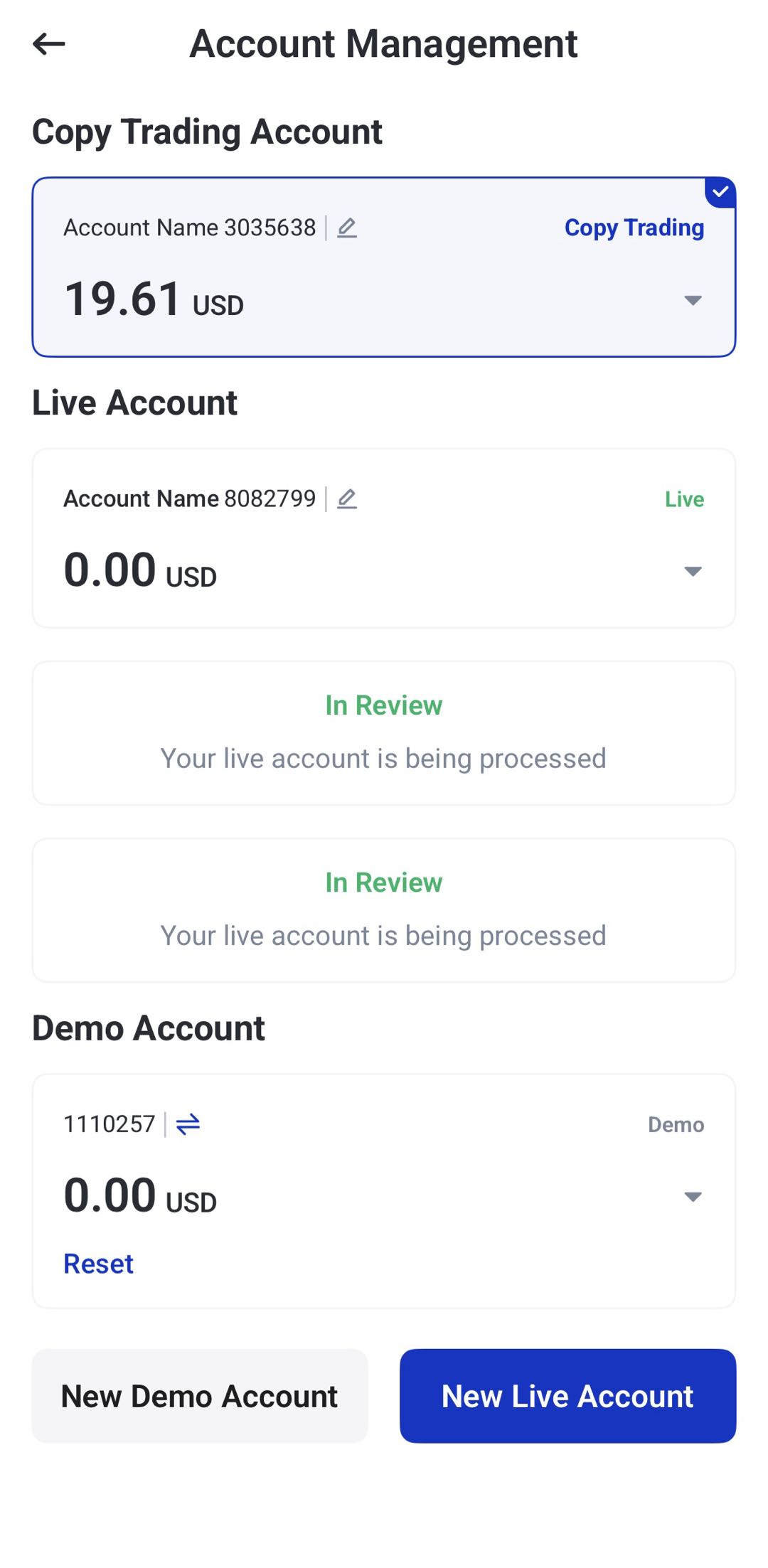
1. Open the VT Markets app, switch your account to copy trading, then navigate to the Copy Trading section.
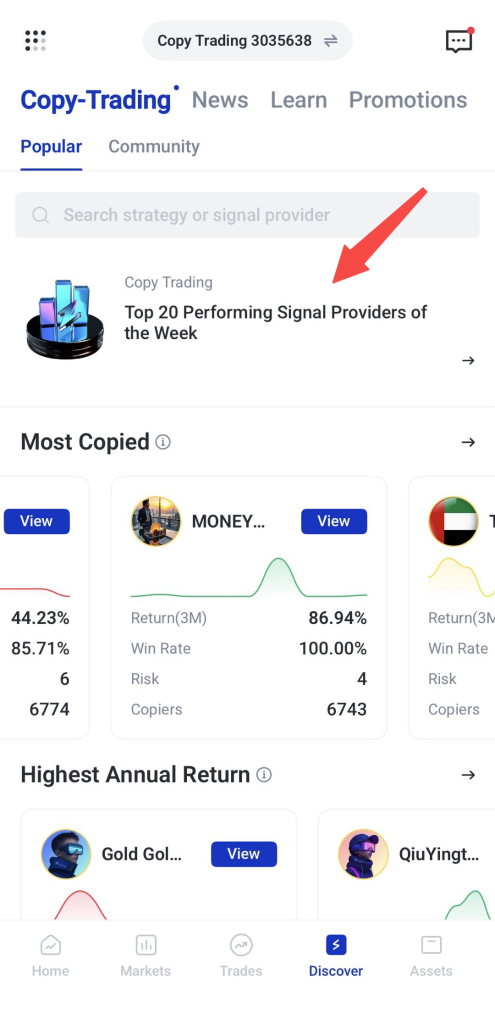
2. Browse available strategy providers or explore the Top 20 best-performing traders of the week.
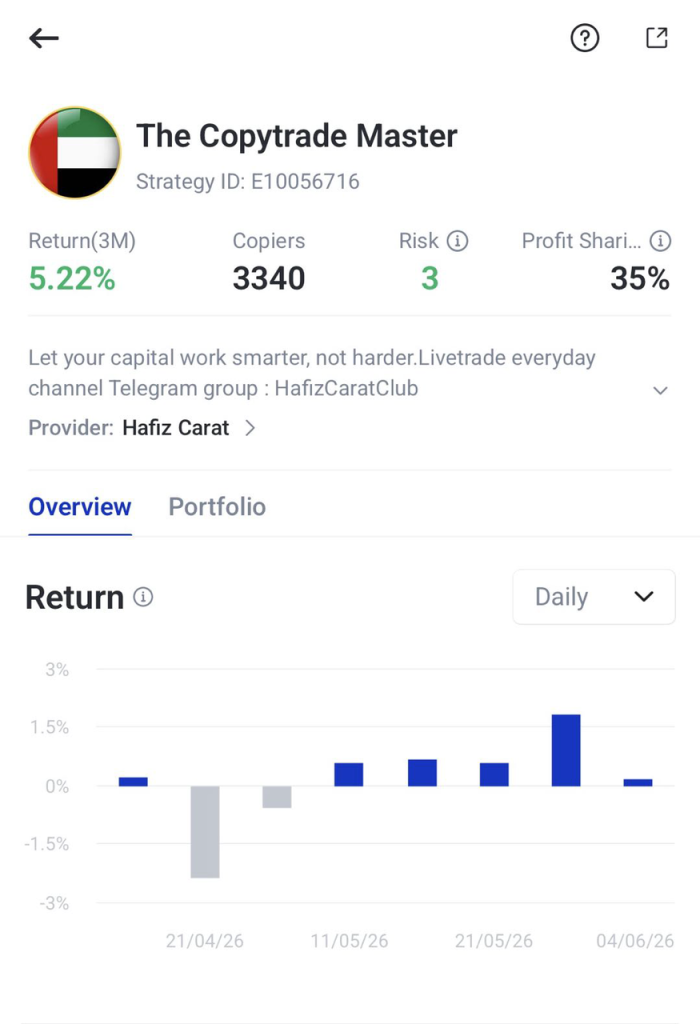
3. Compare different traders by reviewing their performance, trading history, and risk level before selecting one that suits your objectives and risk tolerance. Let’s see the example below:
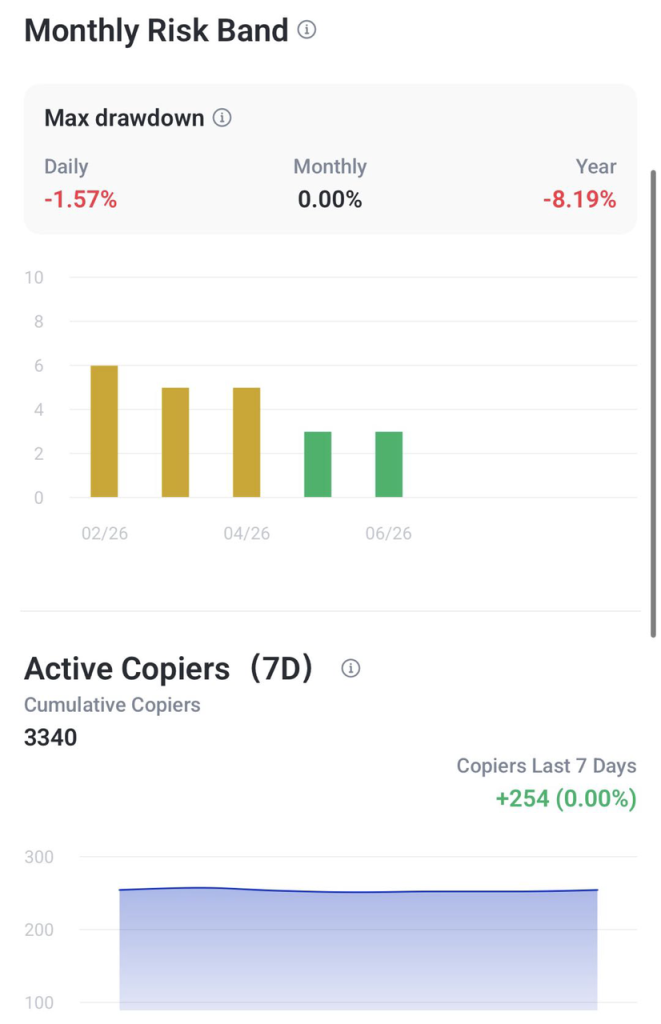
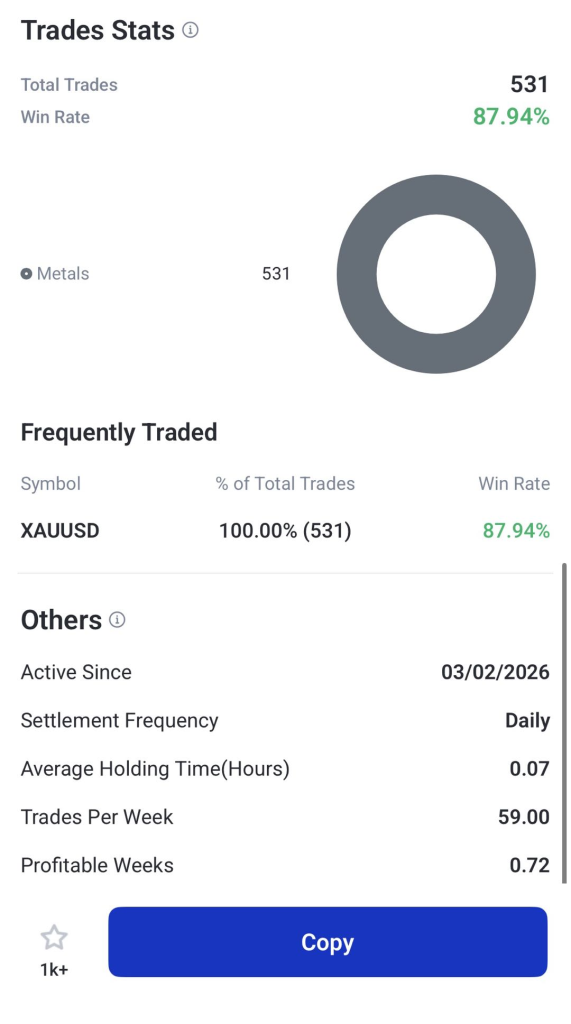
4. Allocate funds and begin copying trades automatically.
5. Monitor performance regularly and adjust your settings when needed.
Want to learn more about copy trading? Read these guides:
- 5 Common Mistakes to Avoid When Copy Trading
- A Complete Beginner’s Guide to Copy Trading in 2026
- How to Choose the Right Strategy Provider
- How to Evaluate Copy Trading Providers: Key Metrics Every Trader Should Know
Multi-Timeframe Analysis
Markets can look very different depending on the timeframe being viewed. A short-term chart may show recent price fluctuations, while a longer-term chart can help identify broader trends.
Multi-timeframe analysis allows traders to switch between chart intervals without leaving the chart screen, making it easier to understand market movement from different perspectives.
How to use multi-timeframe analysis on the VT Markets app:
1. Open the chart of your chosen instrument.
2. Tap the timeframe menu and select chart intervals.
3. Switch between timeframes to compare short-term and long-term price movement.
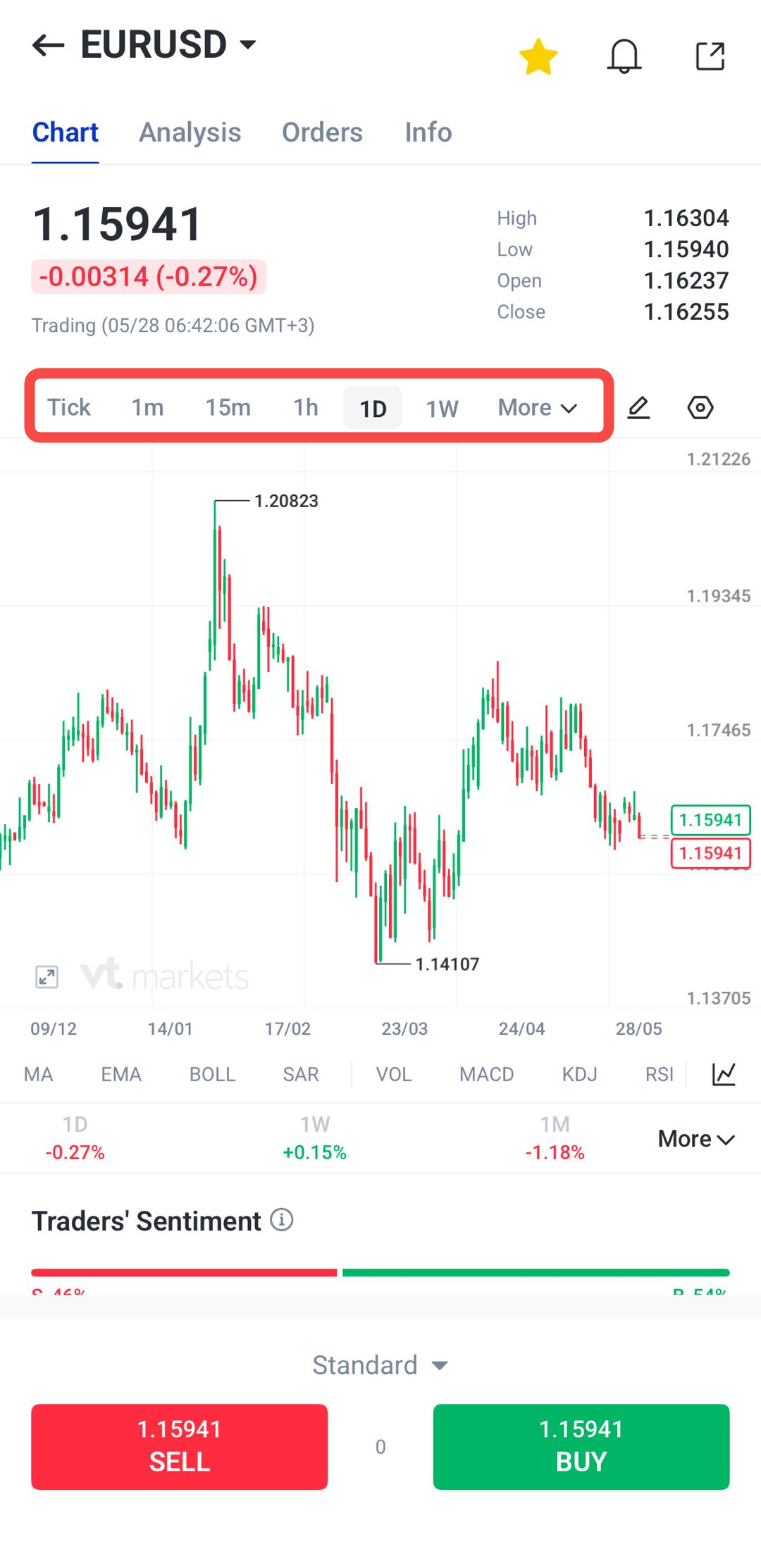
4. Apply indicators if required to support your analysis.
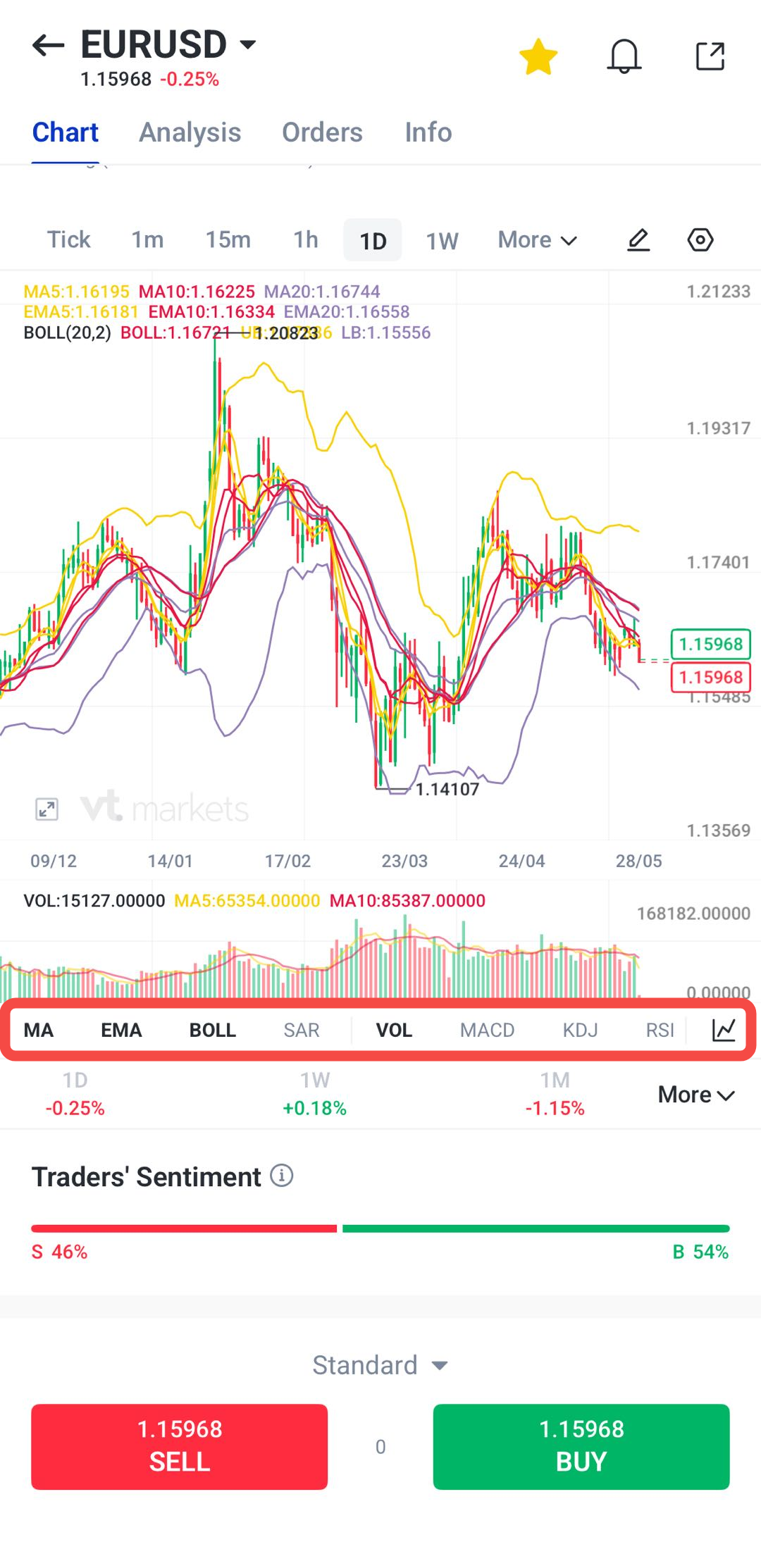
One-Tap Trading
One-Tap Trading allows traders to place orders more quickly by reducing the number of steps needed to enter or exit a position.
This feature can be useful when markets are moving quickly, although beginners may prefer to review their orders carefully before enabling faster execution options.
How to use one-tap trading on the VT Markets app:
1. Open the chart of the instrument you want to trade.
2. Navigate to the One-Tap button above the sell and buy options
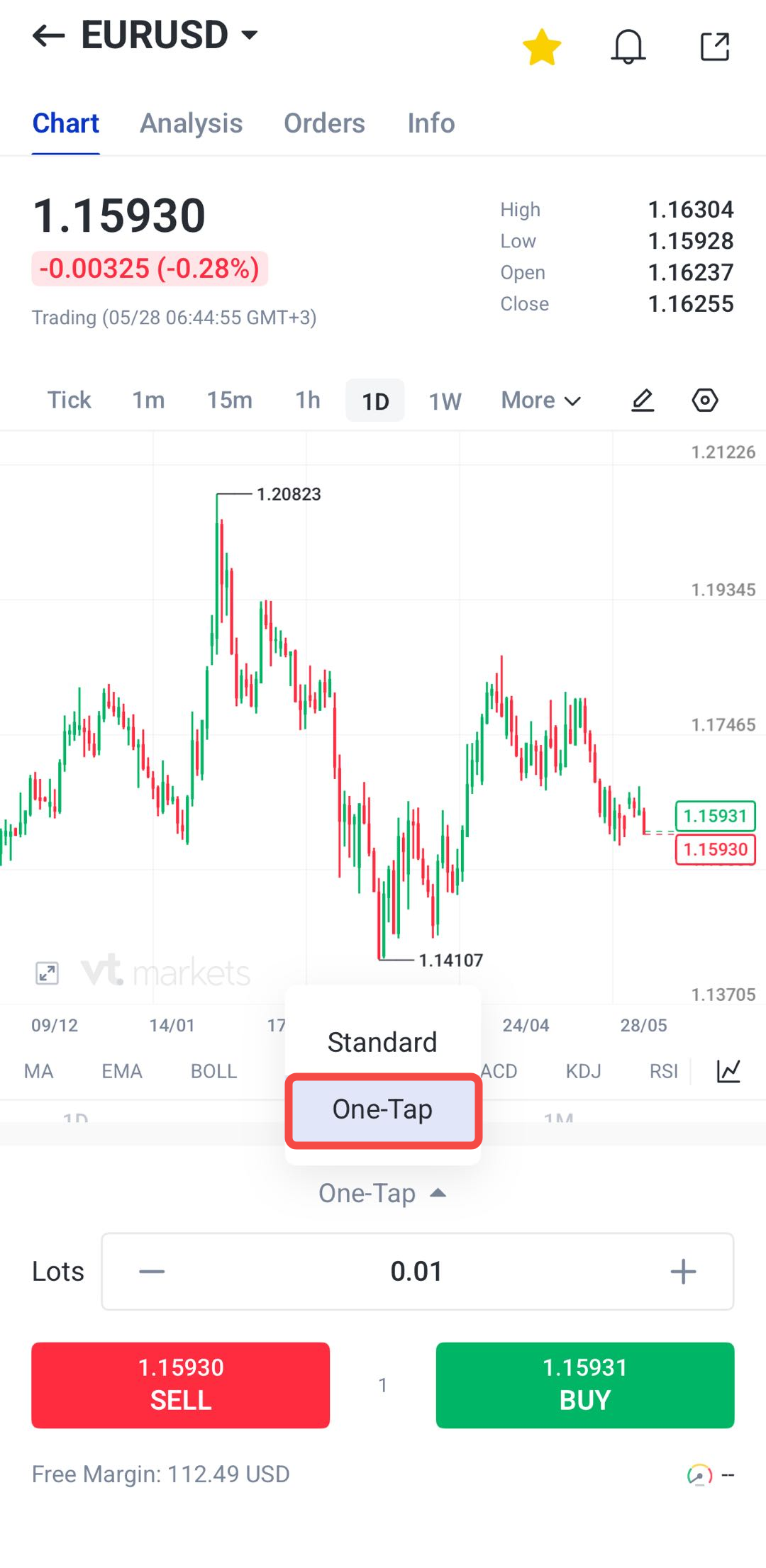
3. Configure your trading preferences, including open position, stop loss, take profit levels and more.
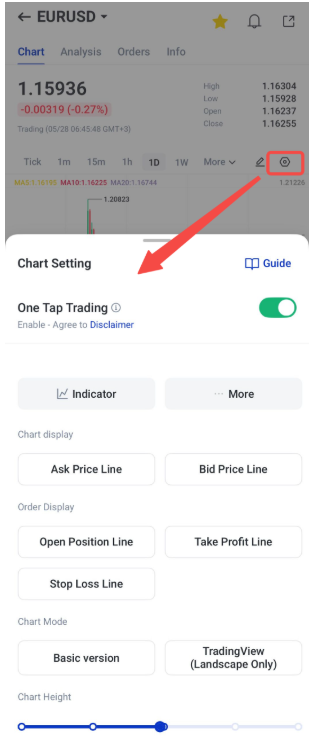
4. Review the settings carefully.
5. You may also check this guide to understand the chart setting better.
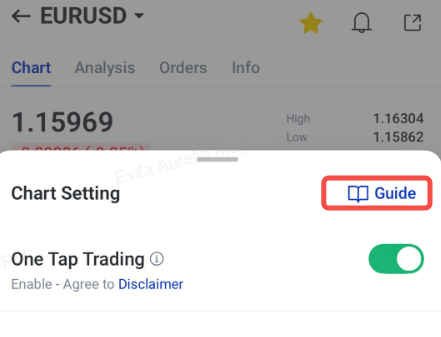
Note: Beginners may keep the One Tap trading options turned off to reduce the chance of accidental orders. More experienced traders may adjust their settings based on their trading preferences.
Two-Factor Authentication
Protecting your trading account is just as important as managing your trades. Two-factor authentication adds an extra layer of security by requiring a verification code in addition to your password. This helps reduce the risk of unauthorised access, even if your password is compromised.
How to set up two-factor authentication on the VT Markets app:
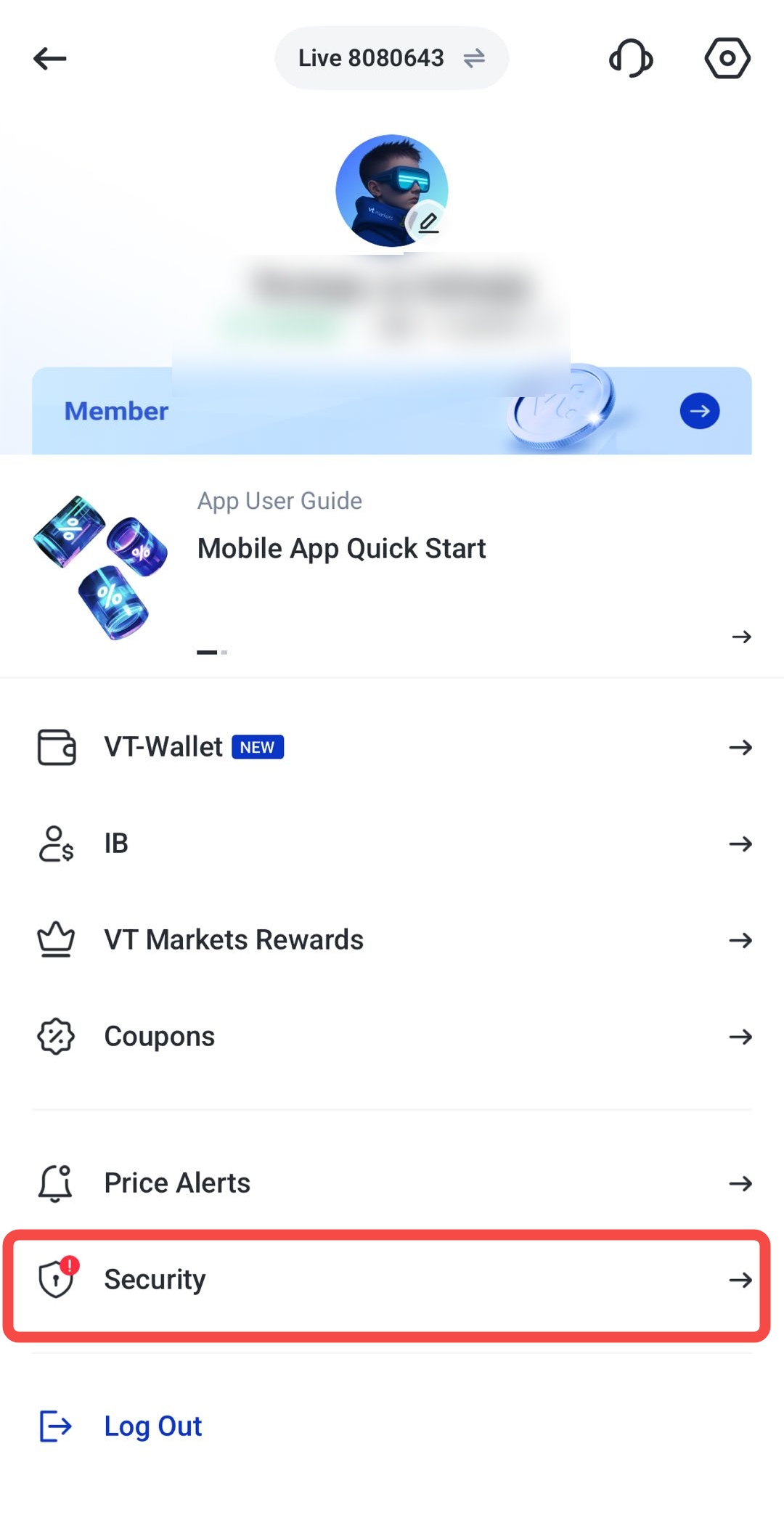
1. Open the dashboard and click this menu button.
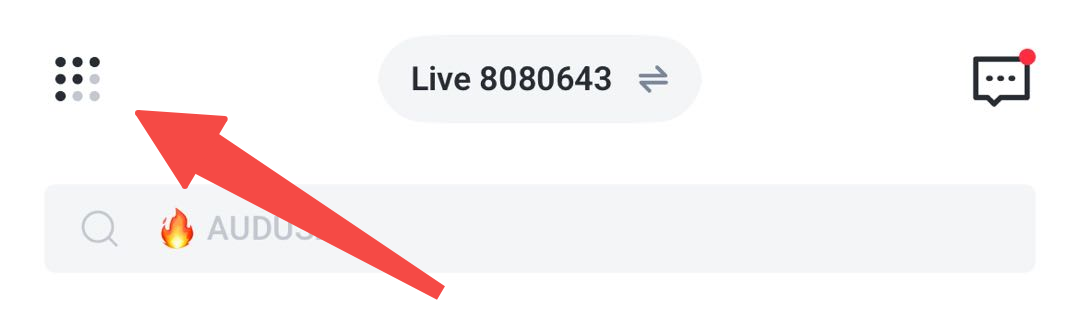
2. Select Security options
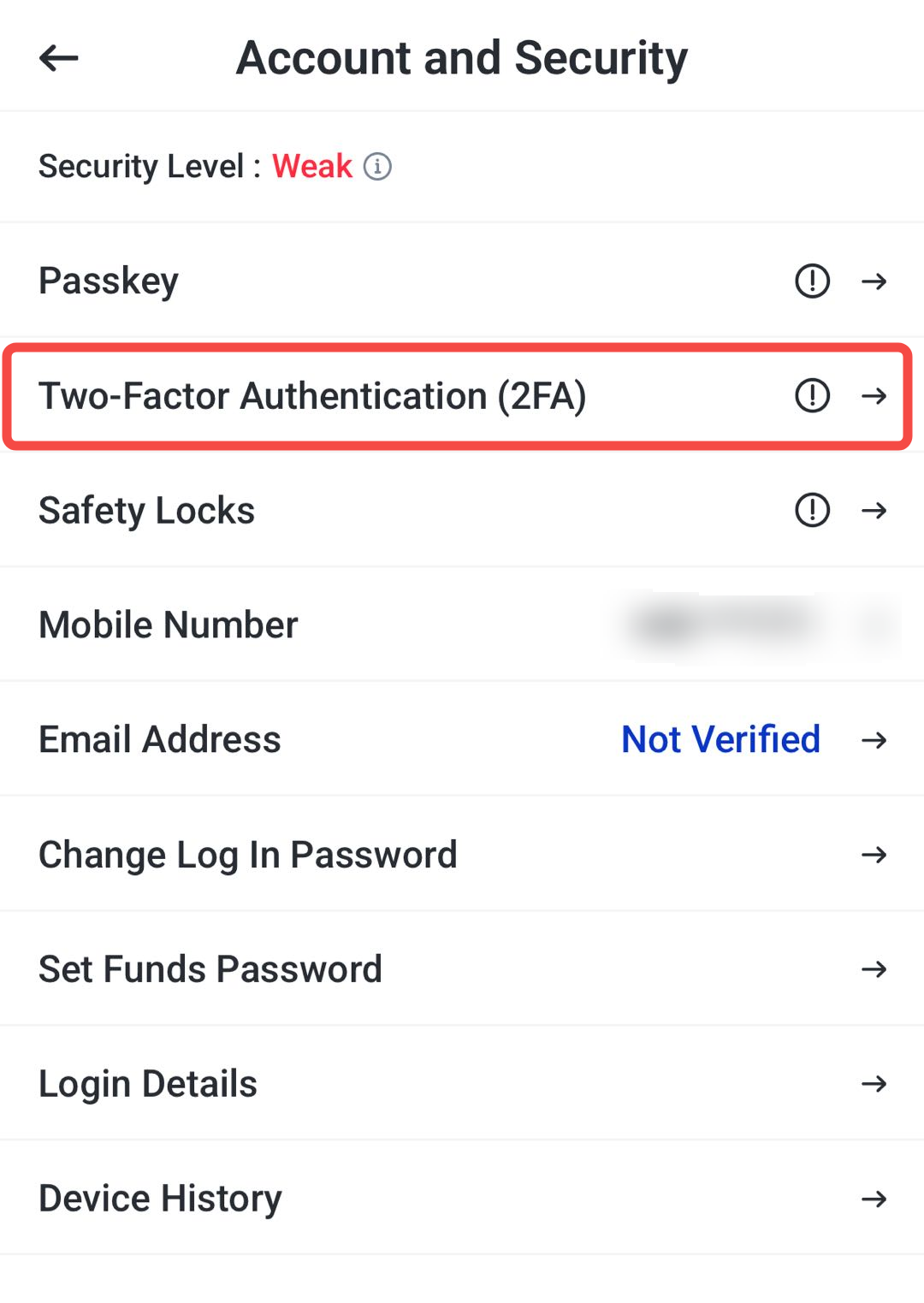
3. Click Two-Factor Authentication (2FA)
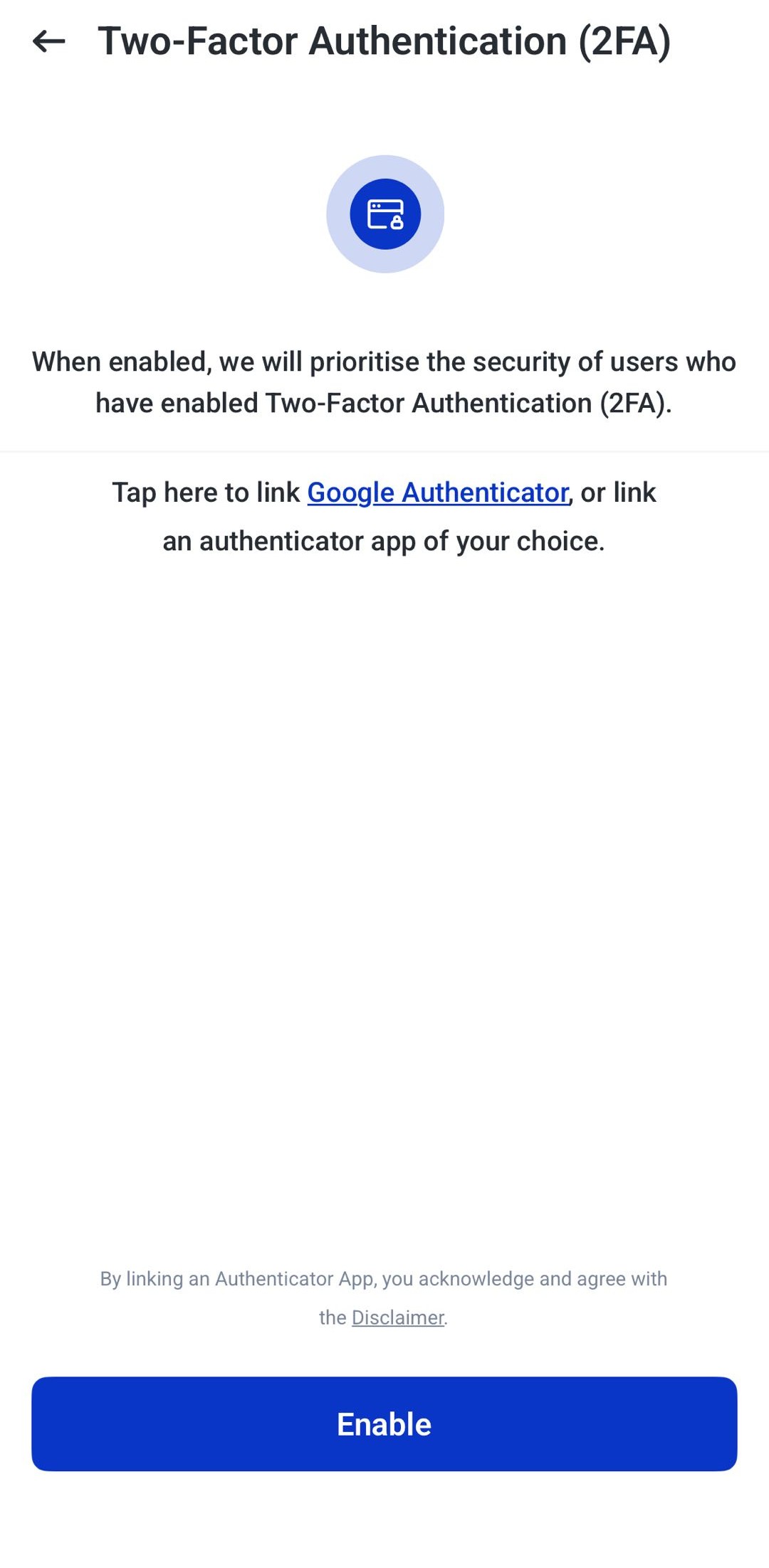
4. Click enable and follow the instructions to link it with Google Authenticator or other authenticator app of your choice.
5. Use the verification code provided whenever logging in or confirming sensitive actions.
Advanced Trading Tools in the VT Markets App
In addition to its core features, the VT Markets app includes tools that help traders follow market movements, stay informed, and make more confident trading decisions.
TradingView Chart Integration
Charts help traders visualise how prices move over time. VT Markets integrates TradingView directly into the app, giving users access to advanced charting features without needing a separate platform.
Traders can view price charts, add technical indicators, draw trendlines, and analyse market trends from a single screen. This makes it easier to research a market and place trades in the same environment.
How to use TradingView charts on the VT Markets app:
1. Select an instrument and open the chart window.
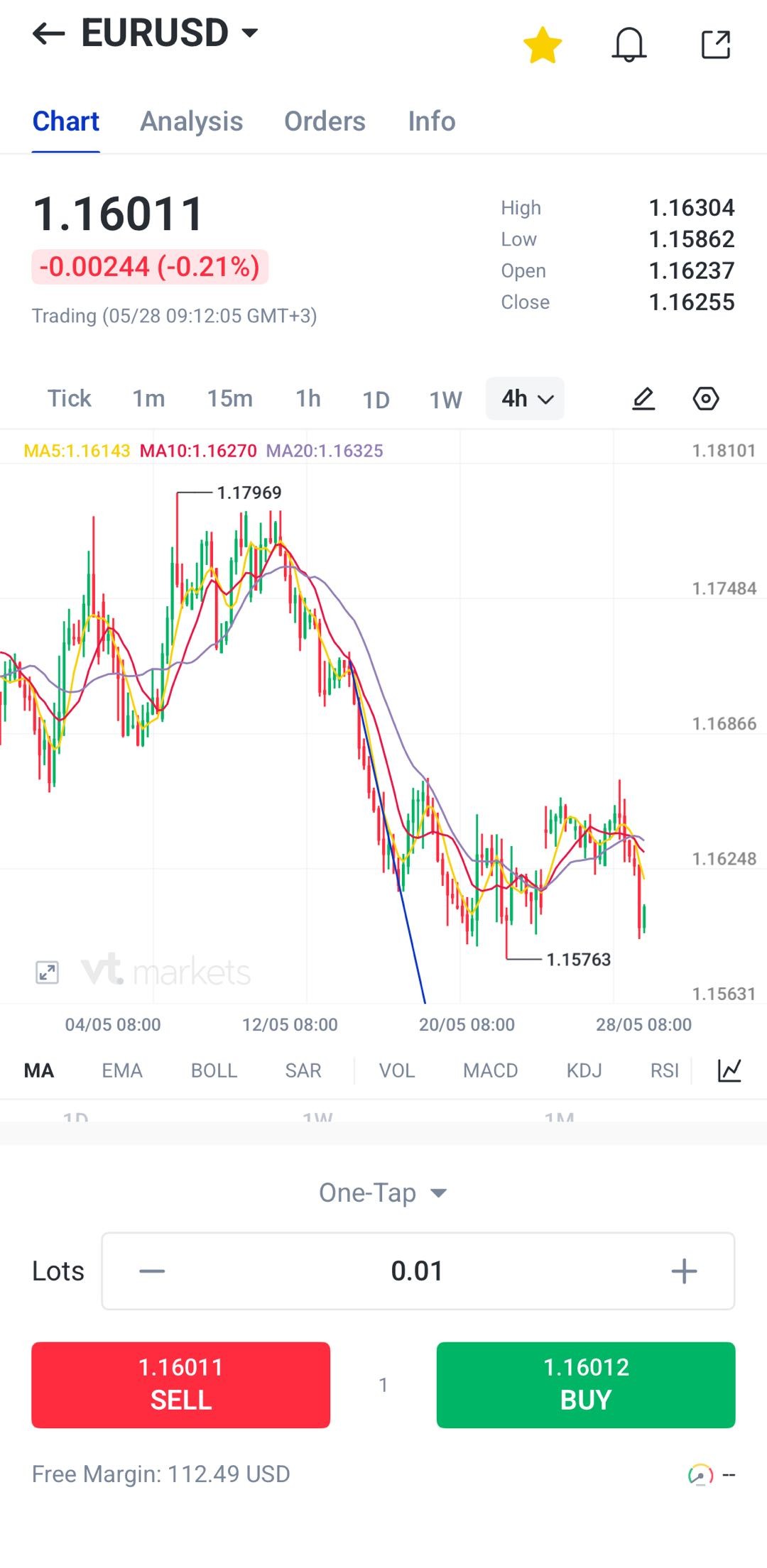
2. Click the button and choose TradingView mode.
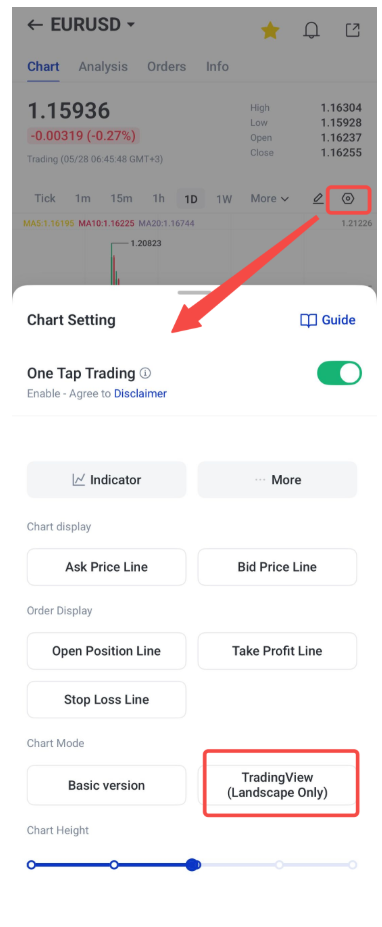
3. The layout will be landscape.
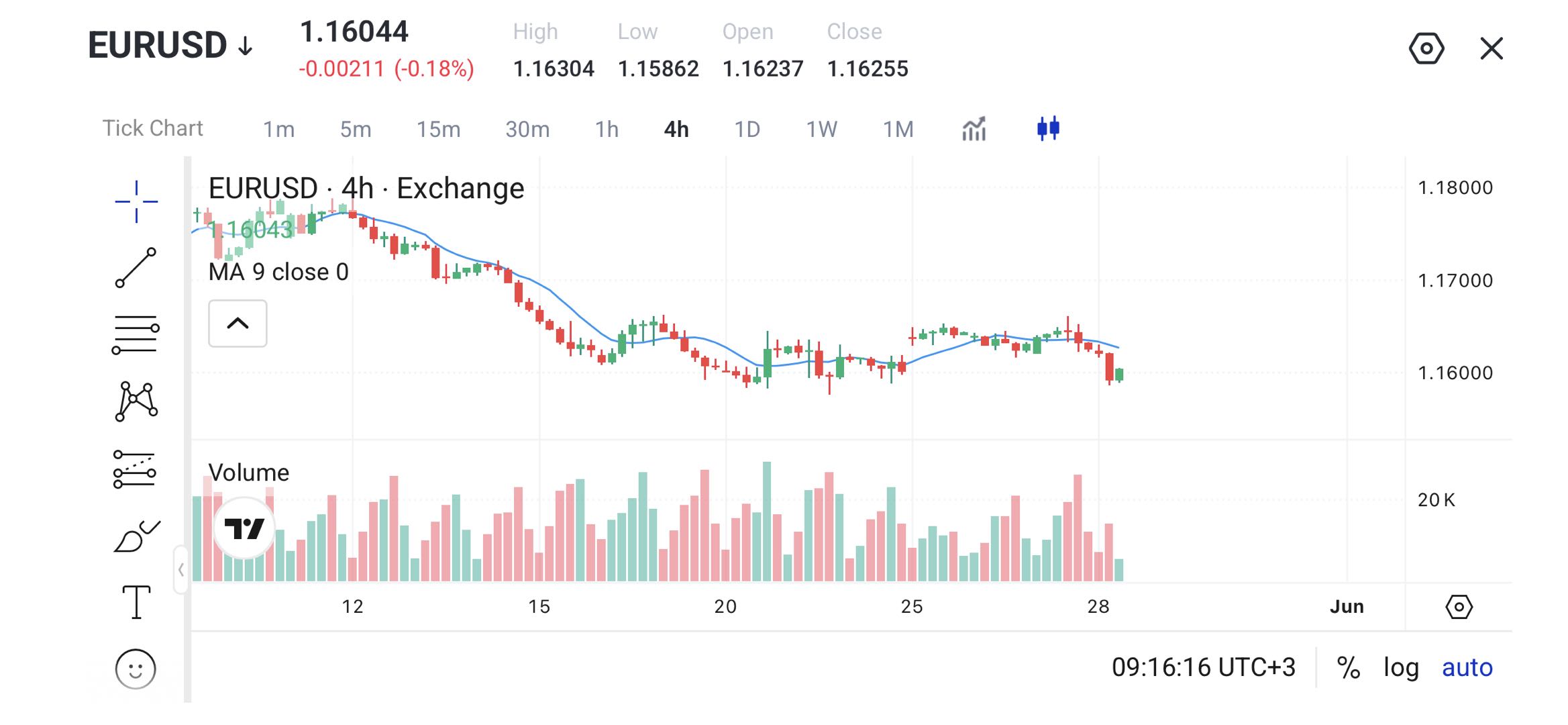
4. Add indicators such as RSI, MACD, Bollinger Bands, moving averages and more.
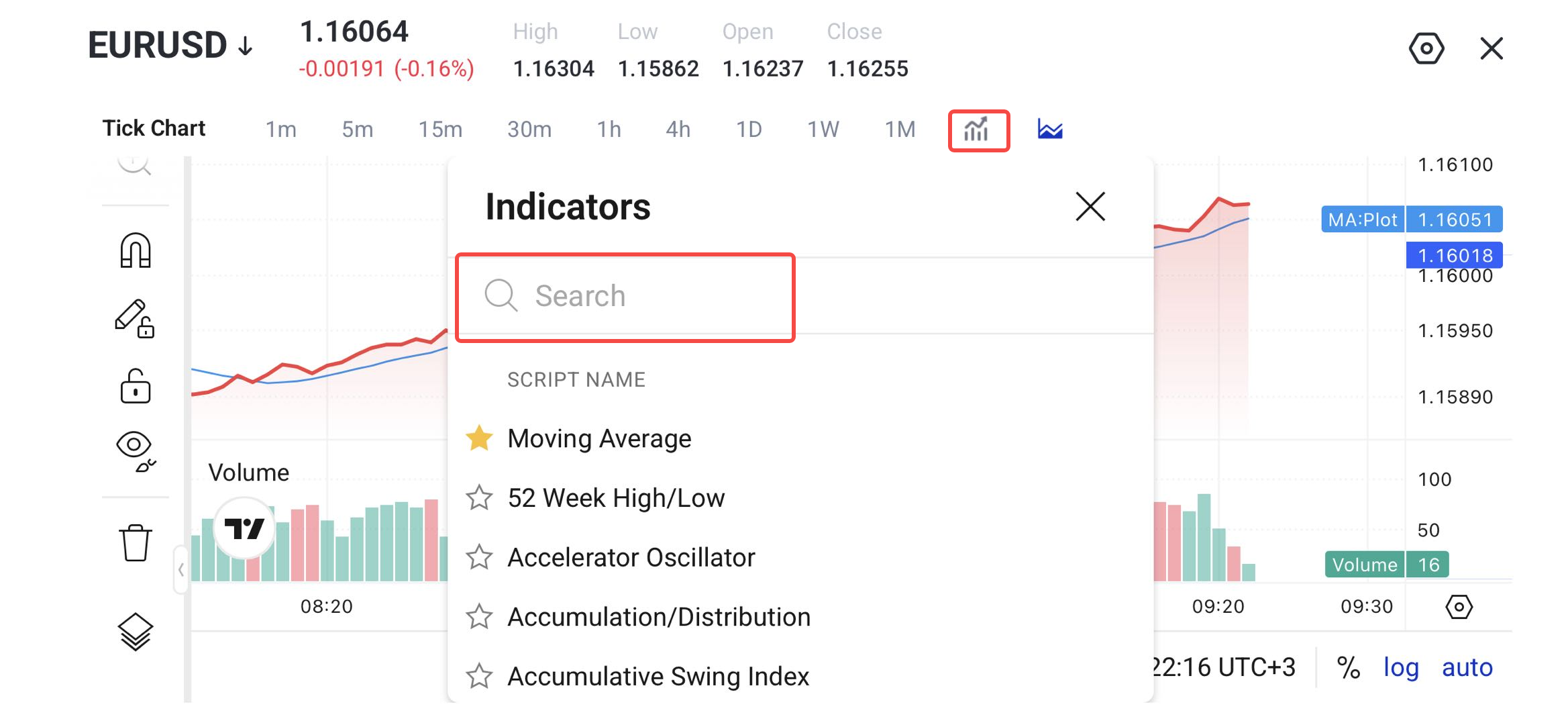
5. Use drawing tools to mark trendlines, support levels, and resistance levels.
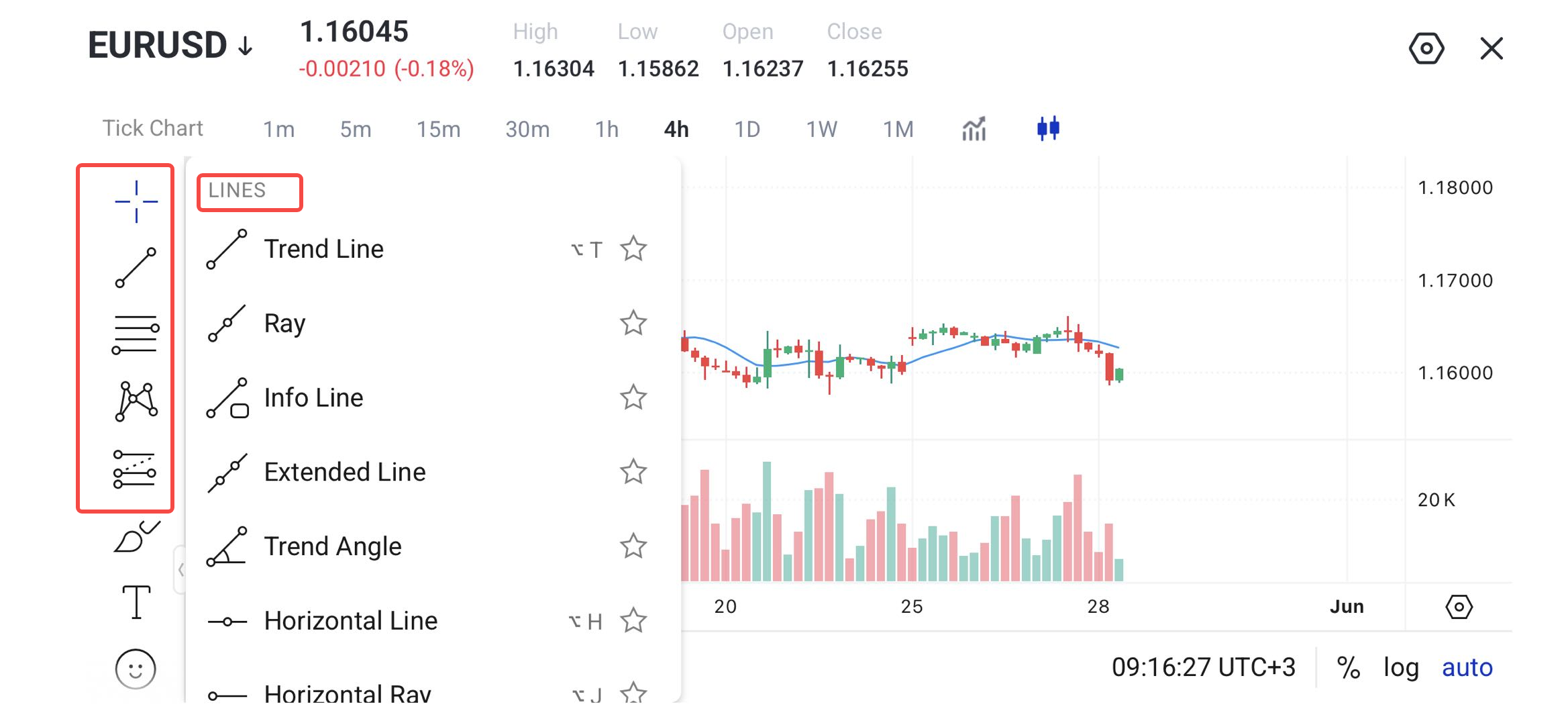
6. Review your analysis and switch back to portrait mode.
Economic Calendar and Alerts
Financial markets can react strongly to major economic events. Interest rate decisions, inflation reports, employment data, and economic growth figures can all influence market prices.
The Economic Calendar helps traders stay informed about upcoming events and understand when markets may become more active. Alerts can also be set to provide reminders before important announcements.
How to use the economic calendar on the VT Markets app:
1. Navigate to Discover → News → Economic Calendar.
2. Review upcoming events, including date, time, and impact level.
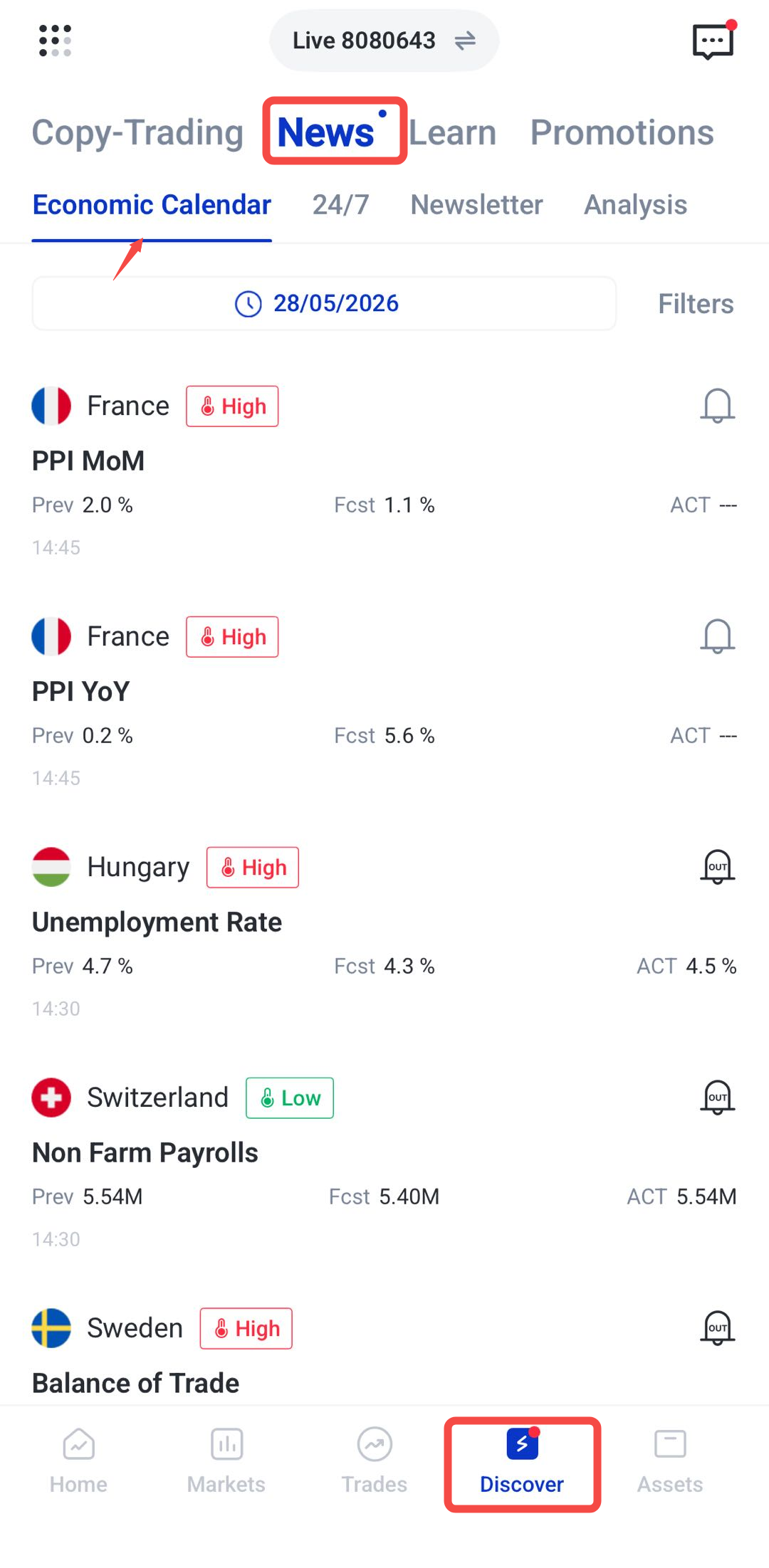
3. Set notifications for high-impact events to receive push alerts.
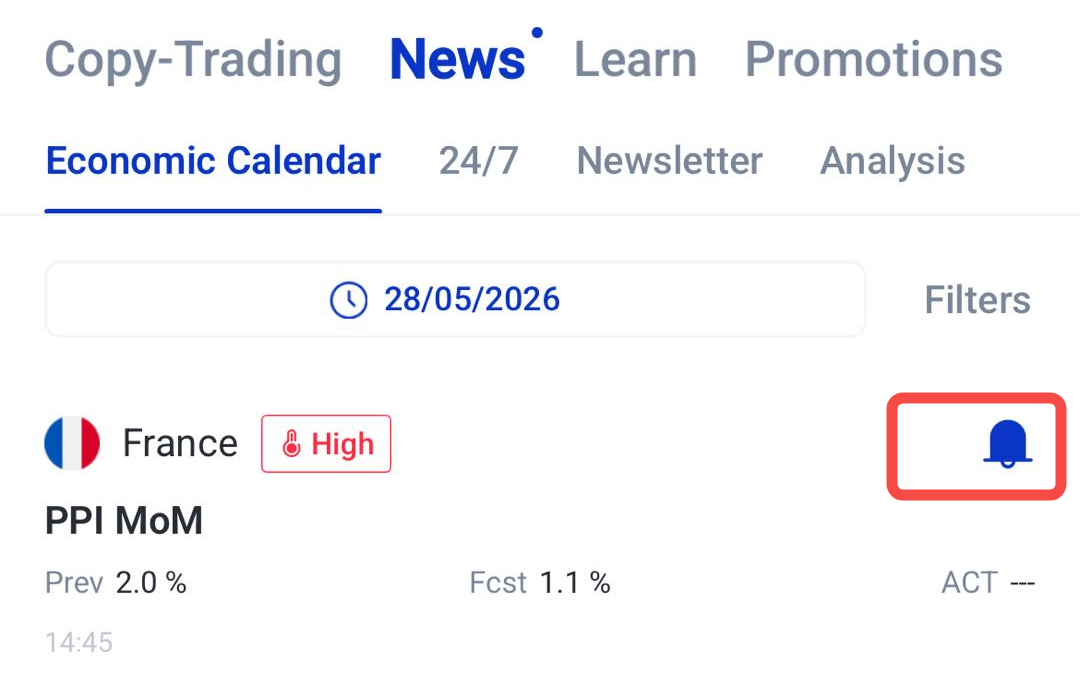
4. Adjust trading positions in advance or avoid the market during high-risk periods.
Market Analysis from Trading Central
Understanding market movements can be challenging, especially for new traders. The VT Markets app includes market analysis from Trading Central, a third-party research provider.
Analysis reports may highlight market trends, important price levels, chart patterns, and possible market scenarios. These insights can serve as an additional source of information when researching a market.
While these reports can be useful, they should not be treated as financial advice or guaranteed trading signals. Traders should always conduct their own research and manage risk carefully.
How to use market analysis on the VT Markets app:
1. Select an instrument and open the chart window.
2. Click analysis
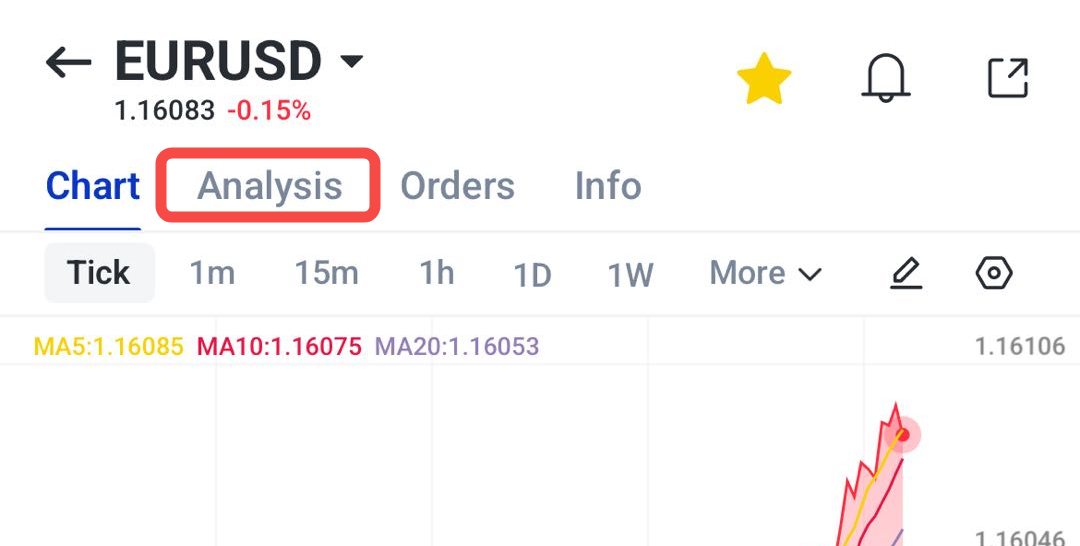
3. Choose a relevant analysis report or news update for the instrument you are reviewing.
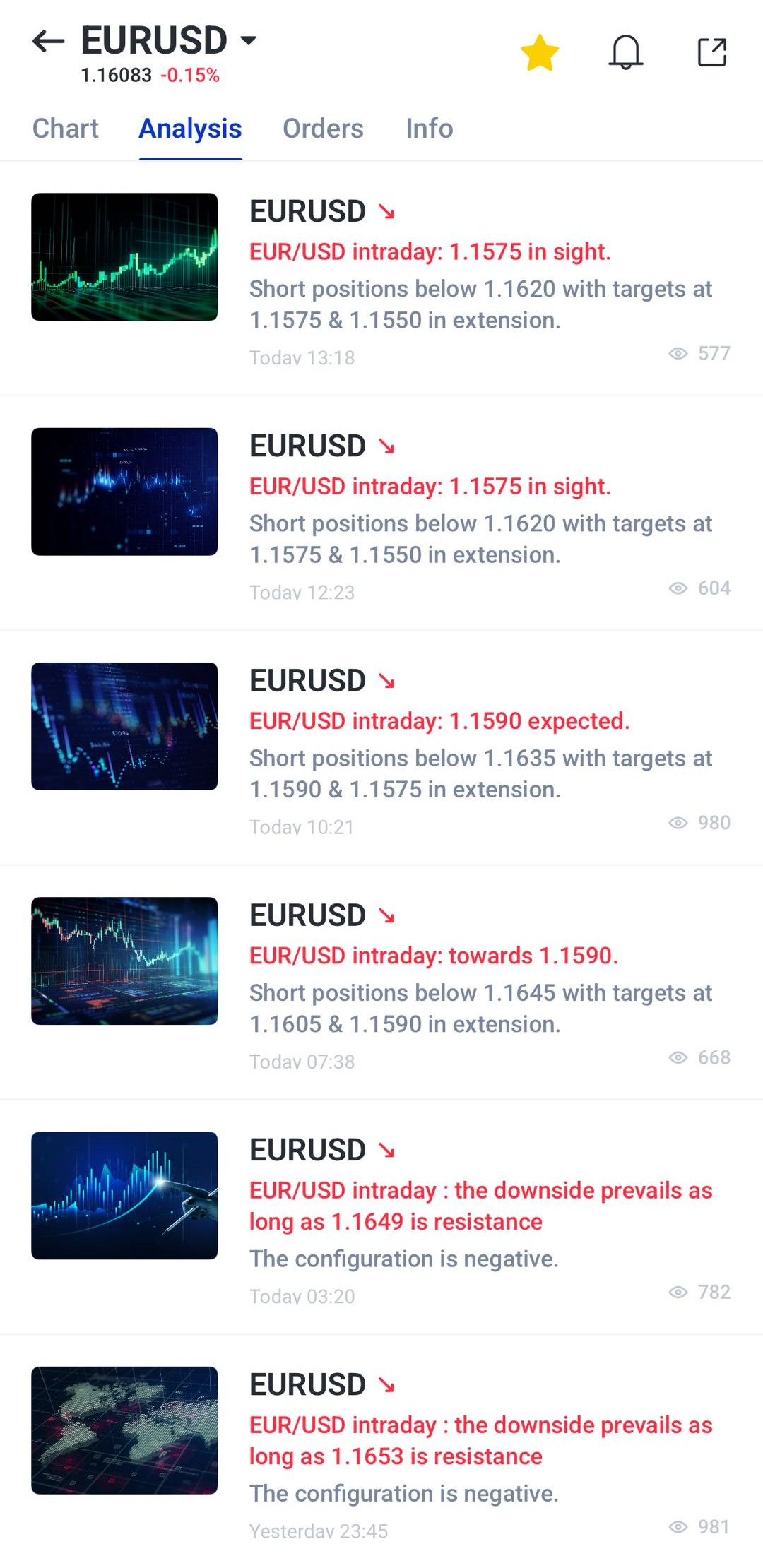
4. Review the chart, price levels, market view, and key notes provided in the report.
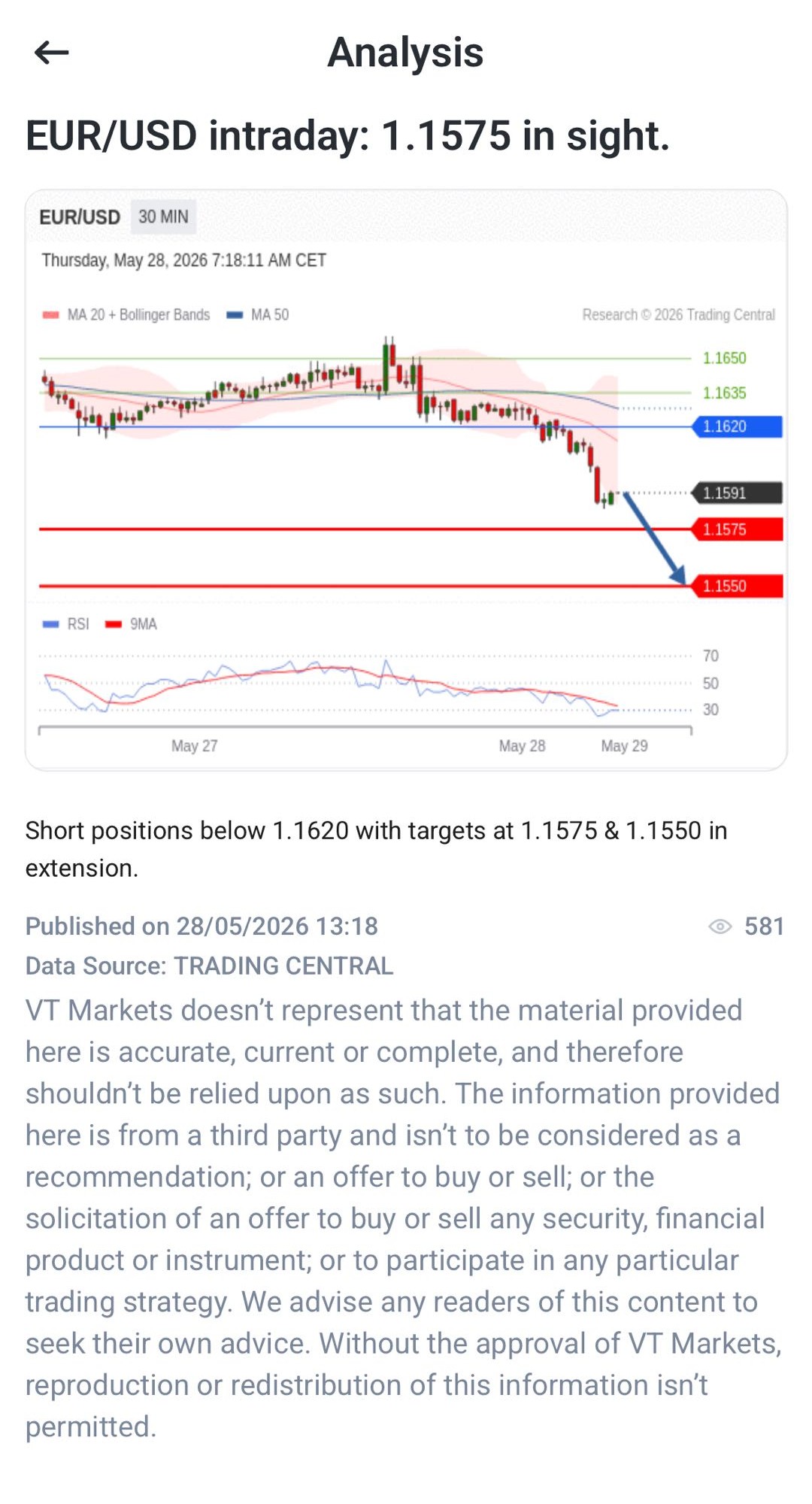
5. Use the analysis as an additional reference when planning trades or managing existing positions.
Technical Indicators
Technical indicators are tools that help traders analyse price movement and identify potential market trends. They can provide additional insights into momentum, volatility, and market direction.
Some of the most commonly used indicators include the Relative Strength Index (RSI), Moving Average Convergence Divergence (MACD), Bollinger Bands, and Moving Averages.
For beginners, it is often best to start with one or two indicators before exploring more advanced combinations.
How to use technical indicators on the VT Markets app:
1. Select an instrument and open the chart window.
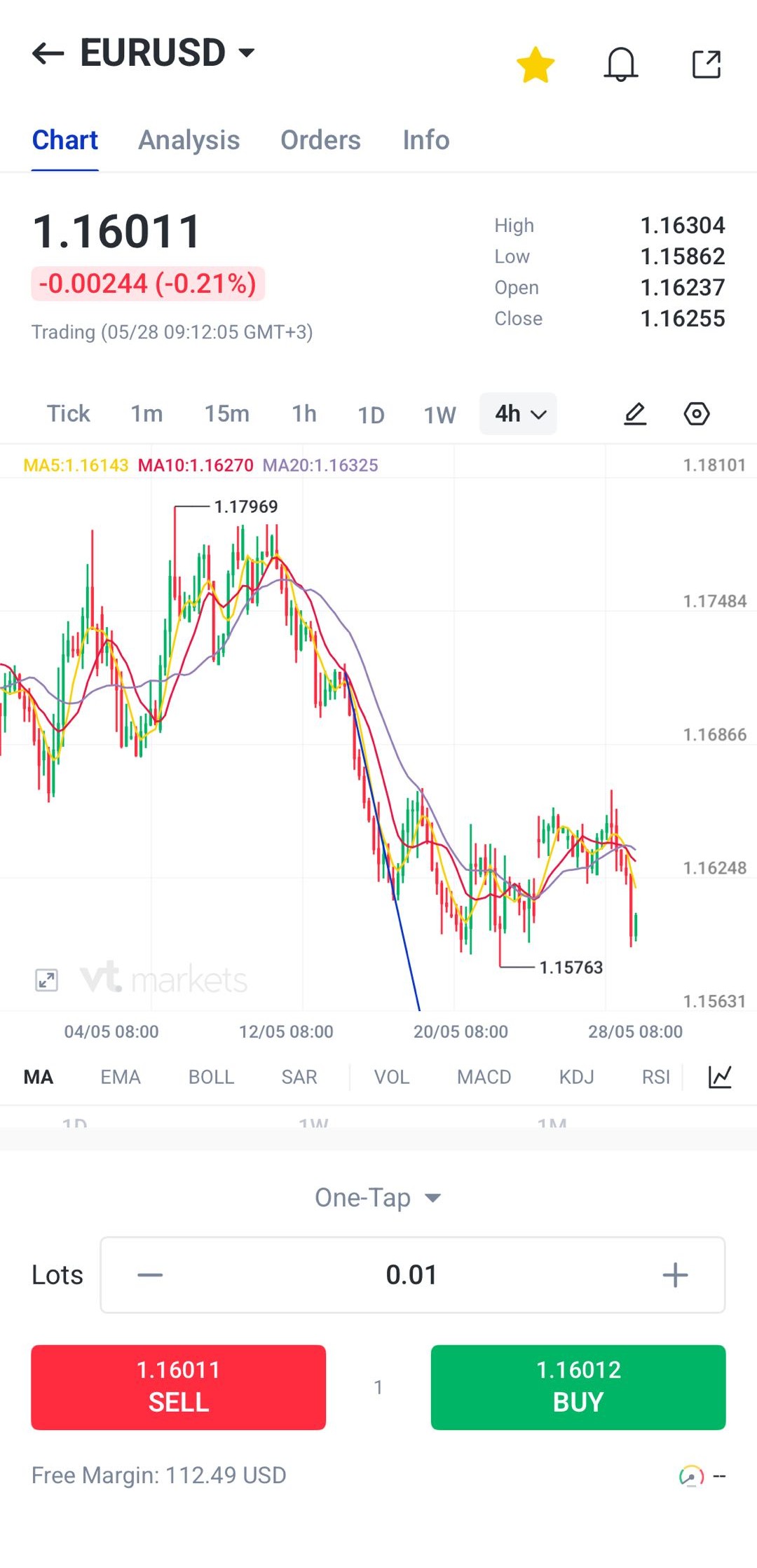
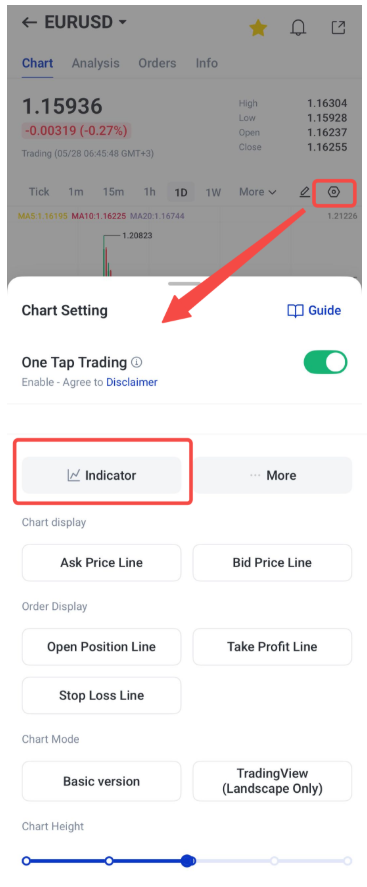
2. Click the button, tap the chart mode and choose Indicators
3. Choose the indicators you want to apply, such as RSI, MACD, Bollinger Bands, or moving averages.
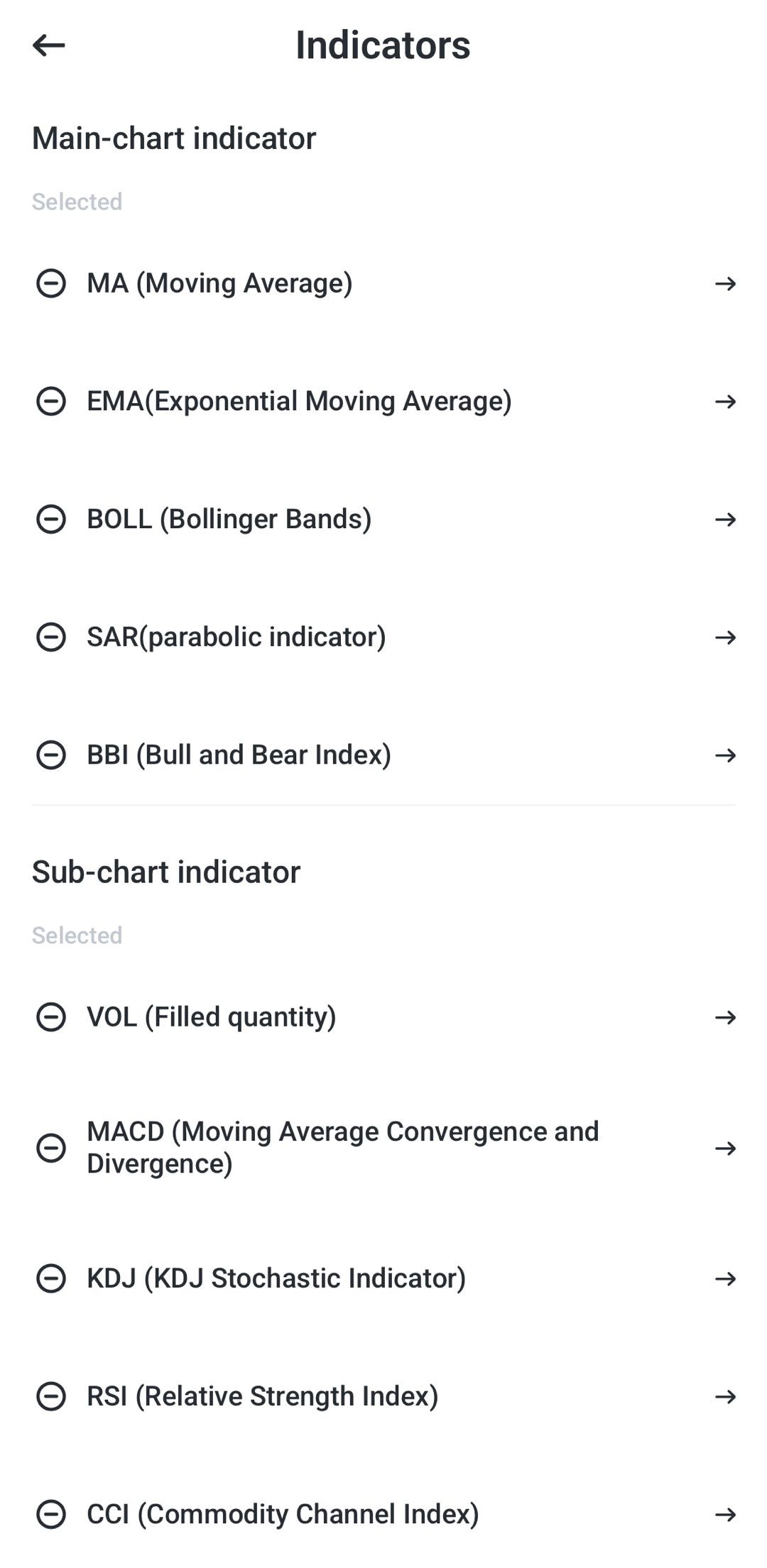
4. Adjust the settings, such as the period length, line colour, or line width.
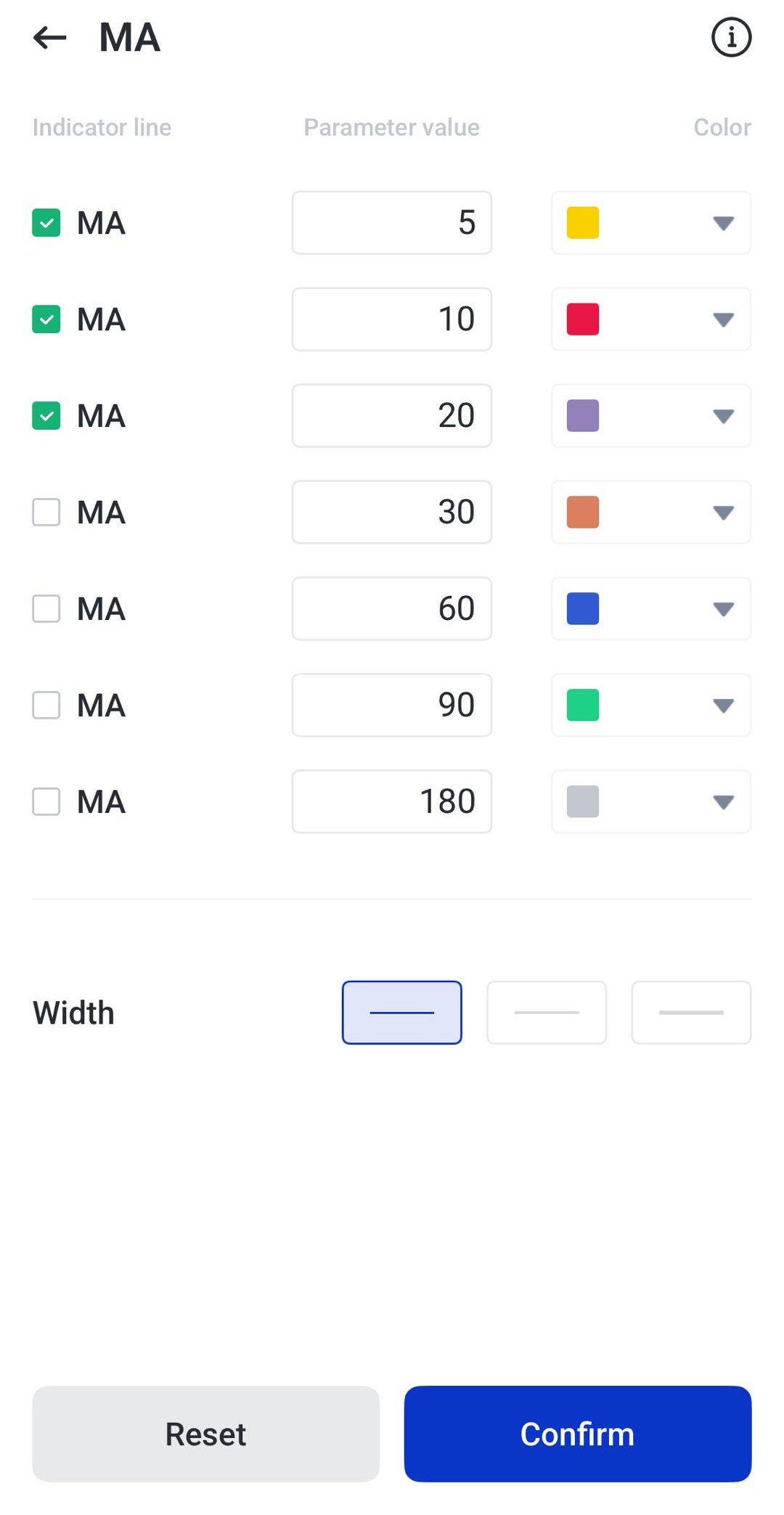
5. Click confirm and review the indicators together with price action to support your trading analysis.
Getting started with VT Markets App
Getting started with the VT Markets app is simple. Follow these steps to create an account, explore the platform, and begin your trading journey.
Download the VT Markets App
The app is available on iOS via the App Store and on Android via Play store. Download the app, create an account, and complete the identity verification process by following the on-screen instructions.
Start with a Demo Account
Before trading with real money, consider starting with a demo account. A demo account is funded with virtual funds, allowing you to explore the platform and practise trading without risking your own capital.
This can help you learn how to place trades, use charts, monitor markets, and become familiar with the app’s features at your own pace.
Upgrade to a Live Account
Once you feel comfortable using the platform, you can open a live account and start trading with real funds.
Many beginners choose to start with smaller trade sizes while they continue building their knowledge and confidence. VT Markets offers different account types to suit different trading needs and experience levels.
Fund Your Account
Once your live account is ready, the next step is to add funds. VT Markets supports a range of payment methods, which may include bank transfers, credit or debit cards, e-wallets, and selected cryptocurrencies, depending on your region.
Select your preferred payment method and follow the on-screen instructions to make a deposit. If you use cryptocurrencies, VT-Wallet can also help you manage and transfer supported digital assets within the app.
Personalise Your Trading Workspace
Once your account is ready, you can personalise the app to suit your preferences. Create a watchlist of markets you want to follow, set price alerts, and customise your charts to make important information easier to find.
Taking a few minutes to organise your app can help you navigate the markets more efficiently and stay focused on the assets that matter most to you.
Ready to Start Your Trading Journey?
Open a live account with VT Markets today and access forex, stocks, commodities, indices, ETFs, bonds, and cryptocurrencies from a single platform.
Whether you’re new to trading or looking to expand your market opportunities, VT Markets provides the tools and flexibility to support your trading journey.
Frequently Asked Questions
Is VT Markets suitable for beginners?
Yes. VT Markets offers beginner-friendly features such as demo accounts, Copy Trading, Cent Accounts, educational resources, and an easy-to-use mobile app. These tools can help new traders learn how markets work before trading larger amounts.
What assets can I trade on VT Markets?
VT Markets provides access to a range of markets, including forex, stocks, commodities, gold, indices, ETFs, bonds, and cryptocurrencies through CFDs.
Does VT Markets offer a demo account?
Yes. A demo account allows you to practise trading with virtual funds in real market conditions. This can help you become familiar with the platform and test trading ideas without risking real money.
What is Copy Trading?
Copy Trading allows you to automatically replicate the trades of experienced traders. Beginners can use this feature to learn how experienced traders approach the markets while maintaining control over their own accounts.
What platforms does VT Markets support?
VT Markets supports its own mobile trading app, as well as MetaTrader 4 (MT4) and MetaTrader 5 (MT5). Traders can access charts, analysis tools, and account management features across multiple devices.
Is VT Markets regulated?
Yes. VT Markets is regulated by FSCA (South Africa), FSC (Mauritius), and CMA (UAE) as a Category 5 licence, ensuring compliance with financial regulations and oversight of client funds.
How can I fund my VT Markets account?
Depending on your region, you may be able to deposit funds using bank transfers, credit or debit cards, e-wallets, and selected cryptocurrencies. VT Wallet is also available for managing supported digital assets.
Is my money safe with VT Markets?
VT Markets maintains client funds in segregated accounts and follows compliance procedures such as AML and KYC requirements. Eligible clients may also have access to client fund insurance coverage, subject to applicable terms and conditions.
Start trading now – Click here to create your real VT Markets account